[Invoices](https://docs.elest.io/books/billing/page/invoices "Invoices") are created when you manually add credits to your account or automatically if you have activated the auto- refill option. Invoices only include the amount of credits added to your account. Billing and resource utilization details are available separately in each project.
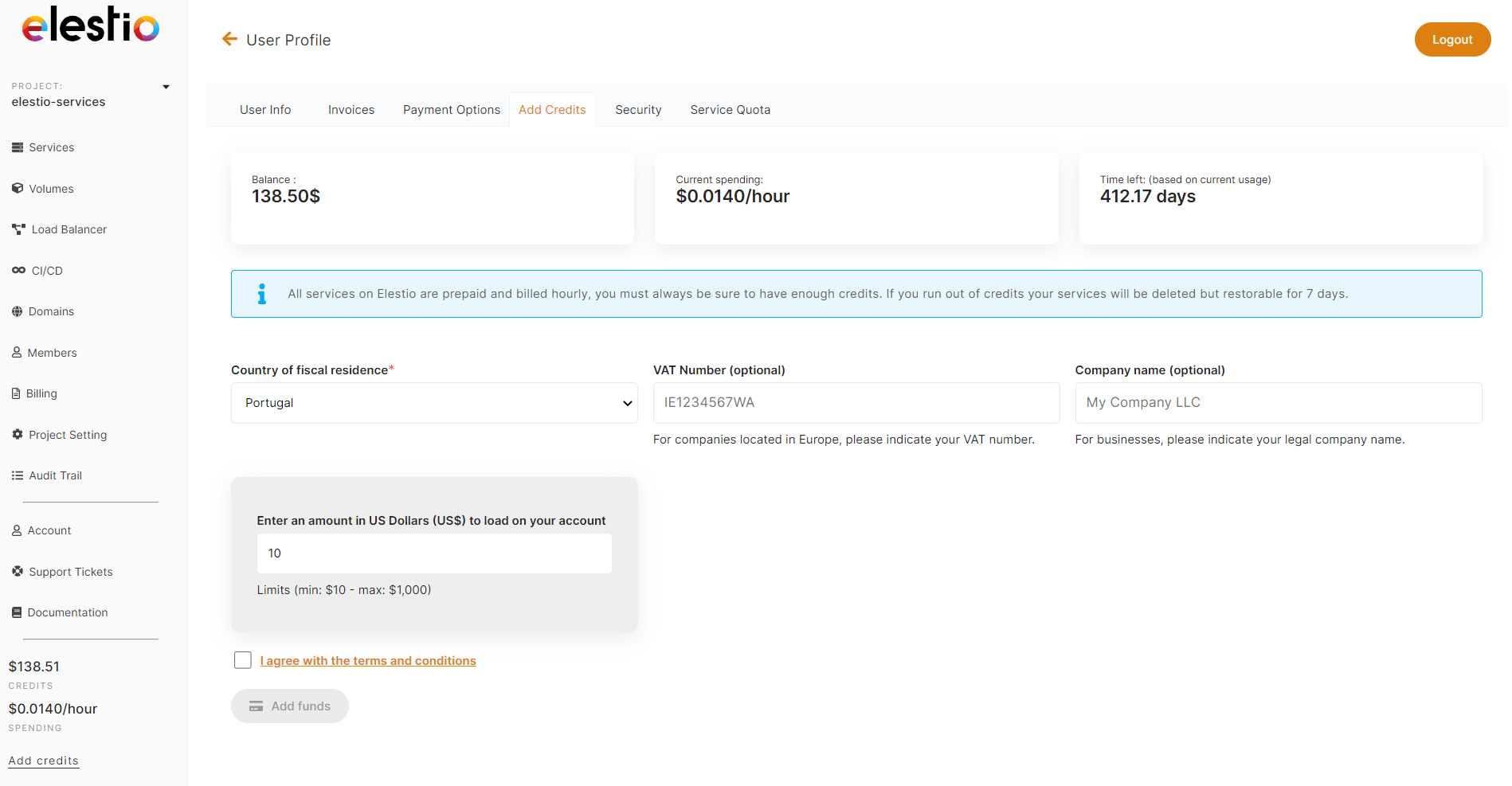
# Add credits ##### Add money to your elestio balance You can easily add credits to your elestio account from your User Profile*.* 1\. Click on the User Icon to access your *User Profile* in the top left above the Main Navigation menu. 2\. Select the *Add Credits* tab. 3\. Enter the amount you wish to add to your account, in US dollars (USD). 4\. Click the *Pay Now.* You will be redirected to the Stripe checkout site to complete your payment.Funds are automatically added to your account upon successful payment. This can take up to a few minutes, but is usually instantaneous.
elestio has a $10 minimum, and a $1,000 maximum per transaction. If you would like to add a larger amount to your account, [contact our sales team](mailto:sales@elest.io) and we'd be happy to talk volume discounts!
If you are a company, please fill out the company relevant fields. This helps us to determine your tax status and whether or not you need to pay VAT.
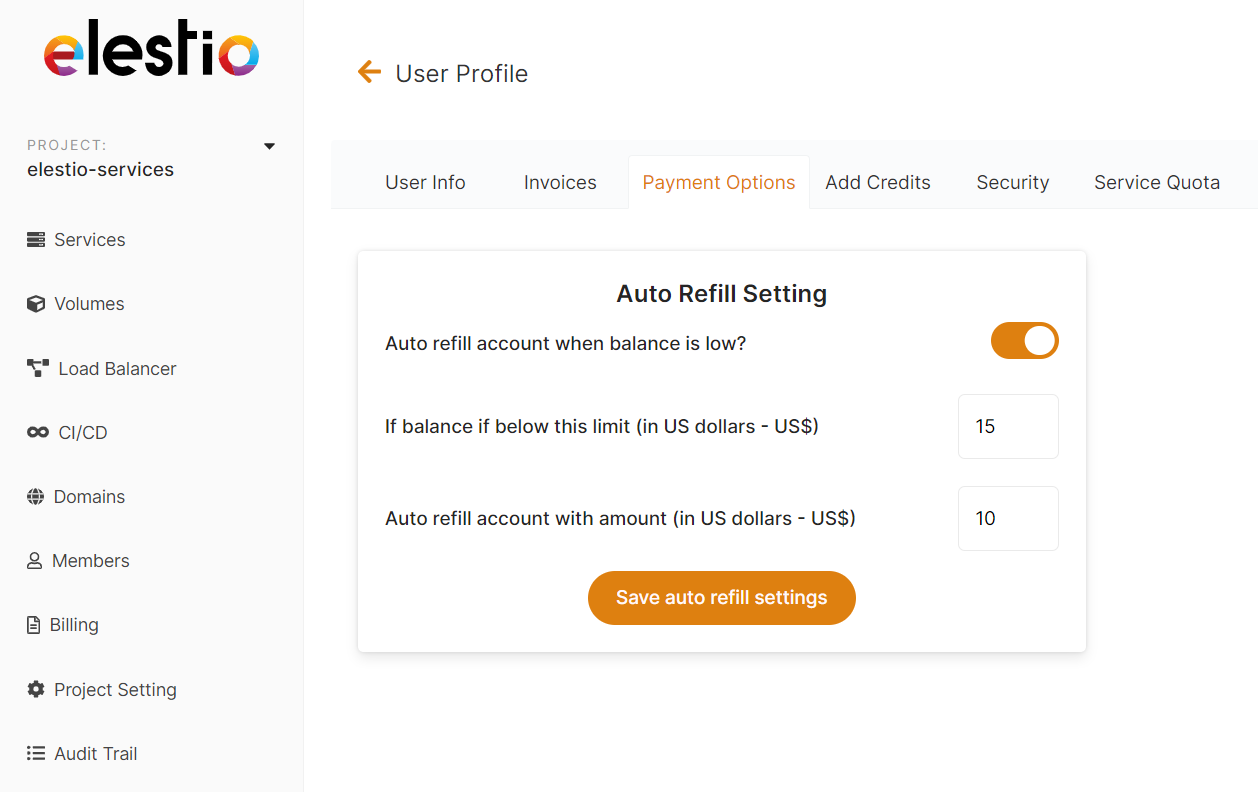
[](https://docs.elest.io/uploads/images/gallery/2022-02/screenshot-2022-02-12-at-22-15-13.png) # Per project details To view a project's billing details, select `Billing` from the left menu, where you'll find a recap and details of all billable items. [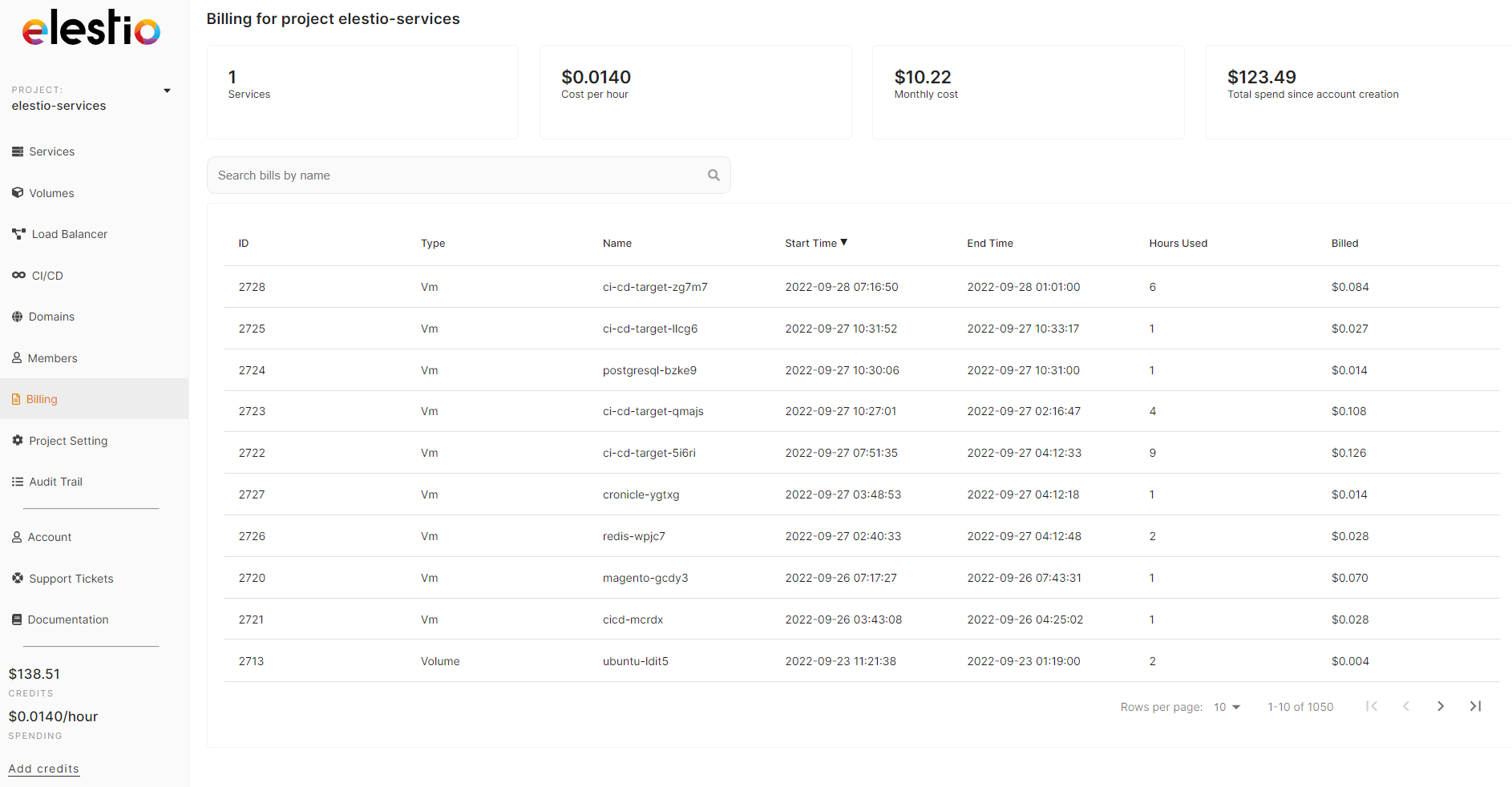](https://docs.elest.io/uploads/images/gallery/2022-01/image-1643211072499.png) # Payment options ##### Never worry about your elestio account balance running out or being too low anymore by using our auto refill option to automatically top it up. **To Enable auto-refill.** 1. Select the Account tab from the left sidebar menu. 2. Select the *Payment Options* tab. 3. Toggle the switch to enable it. 4. Enter the minimum balance for activation of auto-refill 5. Enter your refill amount 6. Save by clicking *Save auto refill settings*Currently, all amounts are in US dollars (USD).
##### ##### **To Disable auto-refill.** 1. Select the Account tab from the left sidebar menu. 2. Select the *Payment Options* tab. 3. Toggle the switch to disable it. 4. Save by clicking *Save auto refill settings.*Auto refill is always enabled by default. To turn off Auto refill, just toggle the switch to off and save the configuration.
[](https://docs.elest.io/uploads/images/gallery/2022-01/image-1643211353770.png)Elestio has a $10 minimum, and a $1,000 maximum per transaction. If you would like to add a larger amount, [contact our sales team](mailto:sales@elest.io) for volume discounts.
# Invoices Easily view, open or download your invoices in one place via your User Profile. Navigate to your User Profile via the user icon at the top left of the Dashboard above the Main menu. Select the *Invoices* tab Invoices are generated when you add credits to your account or when your account auto-refills. [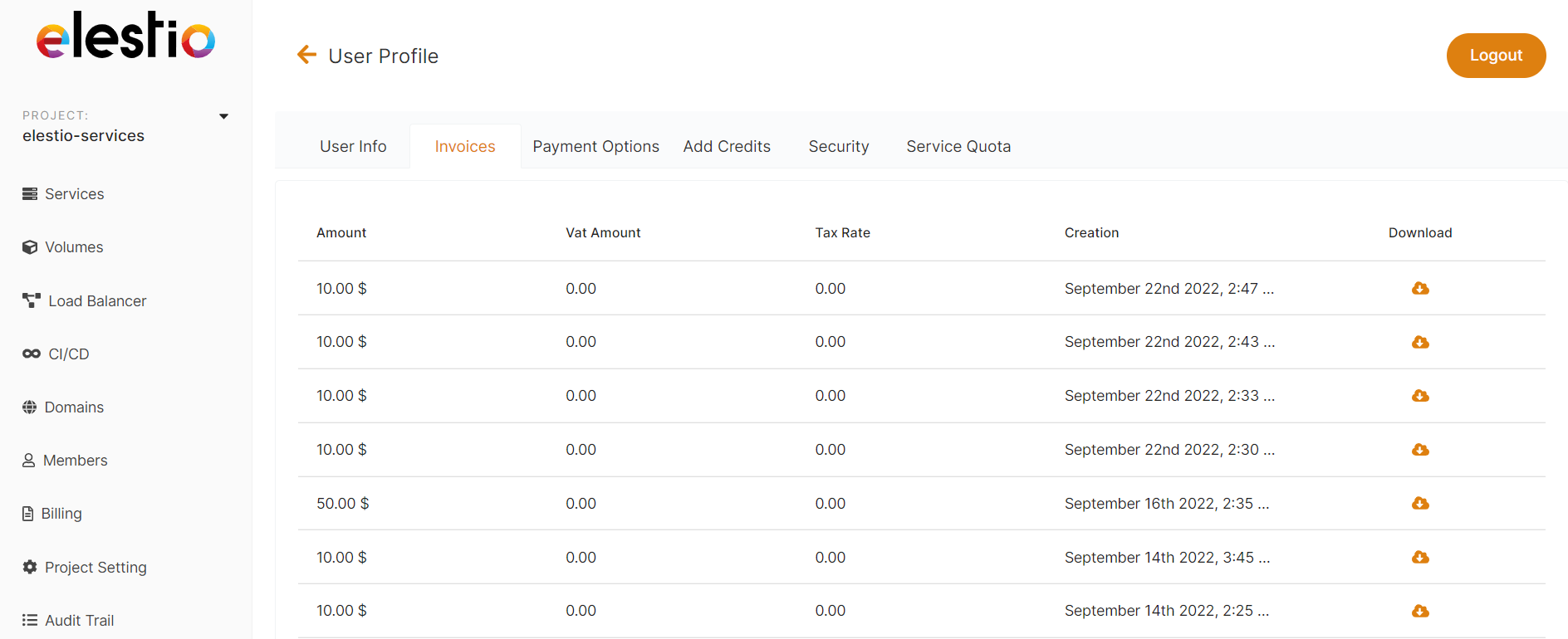](https://docs.elest.io/uploads/images/gallery/2022-09/screenshot-2022-09-28-181022.png) # Free trial Elestio offers a 3-day free trial with $20 in credits, during which you can launch up to 2 services. In addition to the services in our catalog, you have access to load balancers, volumes, and CI/CD pipelines. Domain names are the only thing that cannot be acquired with free credits.For important details about the free trial, please review the [Elestio Free Trial Policy & Fair Use Statement](https://docs.elest.io/books/billing/page/elestio-free-trial-policy-fair-use-statement "Elestio Free Trial Policy & Fair Use Statement").
### End of the Free Trial offer ***The Free Trial ends when you use all of your credit, or after 3 days, whichever happens first.*** At that time, the following conditions apply: - Your account will be automatically renewed for $25 or less based on monthly spending if you have active services. - You'll need to add credits to your account to keep all the services you've deployed. - If you do not wish to be billed, simply delete all services from your account and disable auto-refill.You may disable auto-refill in your payment options from the left sidebar Account tab, or you can click [***here*** ](https://dash.elest.io/account/payment-options "here")to disable auto-refill.
[](https://docs.elest.io/uploads/images/gallery/2022-09/PRjimage.png)Any resources you create during the trial will be destroyed if your account runs out of credits. You may add credit using the add credit tab of the Account tab on the left sidebar, or by clicking [***here*** ](https://dash.elest.io/account/payment "here")to add credits.
[](https://docs.elest.io/uploads/images/gallery/2022-09/image-1.png) # SEPA Direct Debit Payment Option on Elestio At Elestio, we aim to make payment processing as convenient and accessible as possible for our customers. We’re pleased to offer SEPA Direct Debit as a payment option, available to our eligible European customers. This method ensures a secure, easy, and efficient way to manage payments directly from your bank account, adhering to European Union standards. ##### **Eligibility Criteria for SEPA Direct Debit** To maintain secure and streamlined transactions, SEPA Direct Debit is available under the following eligibility criteria: - **Available for European Customers Only:** The SEPA Direct Debit option is exclusively available for customers within the Single Euro Payments Area (SEPA). This area covers all EU countries and a few additional European territories. - **Minimum Hourly Spending Rate:** Eligible customers must maintain an hourly spending rate of at least $0.15. This spending rate is calculated based on your active services and ensures that SEPA Direct Debit aligns with recurring payments for ongoing services. - **Account Age Requirement:** Customers must have been with Elestio for at least one month to qualify for SEPA Direct Debit. This requirement is in place to establish a consistent and reliable payment history, providing a seamless experience for both you and our billing system. If you meet the eligibility criteria and are interested in setting up SEPA Direct Debit, you can do it in the **[Add Credits](https://dash.elest.io/account/payment "Add Credits")** tab. Once enabled, SEPA will be your new secure and convenient method for managing payments on Elestio. # Bandwidth Billing At Elestio, we're committed to transparency and simplicity when it comes to billing. One area where we often receive questions is **bandwidth usage,** especially what happens **after your allocated free bandwidth is exceeded**. This post will walk you through how bandwidth billing works on Elestio, depending on the cloud provider and region you're using. --- #### 🔍 Understanding Bandwidth Allocation Every Elestio service comes with a **generous amount of free bandwidth** included in your service plan. This is usually sufficient for most typical workloads. However, if your usage exceeds this free allocation, additional bandwidth usage will be billed separately based on your cloud provider and region. --- #### 💰 Bandwidth Pricing Breakdown Here's how we calculate **bandwidth charges after you exceed the free allocation**: ##### ✅ Hetzner (Except Singapore Region) - **$0.05 per GB** after free bandwidth is used. - Affordable and ideal for high-traffic workloads. ##### ✅ DigitalOcean (All Regions) - **$0.05 per GB** after exceeding the free limit. - Consistent pricing across all DigitalOcean regions. ##### ✅ NetCup(All Regions) - **$0.02 per GB** after exceeding the free limit. - Consistent pricing across all NetCup regions. ##### ⚠️ Hetzner (Singapore Region) - **$0.15 per GB** after free bandwidth is used. - Higher costs due to Hetzner’s pricing in Asia-based regions. ##### 🌍 All Other Providers - **$0.15 per GB** after the free bandwidth is used. - This applies to providers not explicitly listed above. --- #### 📊 How to Monitor Your Bandwidth Usage You can track your bandwidth usage easily via the Elestio dashboard: 1. Log in to your Elestio account. 2. Navigate to your service details. 3. Check the **Bandwidth Usage** section to view current usage and free limits. --- #### 🧠 Why the Difference in Pricing? Different cloud providers and regions have different network costs. For example: - Regions like **Singapore** have higher infrastructure and transit costs. - Some providers, like **Hetzner/NetCup (EU)** and **DigitalOcean,** offer more affordable network pricing, which we pass directly to you. Our goal is to **always keep pricing fair, transparent, and aligned with actual costs**. --- #### 📩 Questions? If you have any questions about your bandwidth usage or billing, feel free to reach out to