# Connecting with Go
This guide walks you through setting up a Go application to connect to a Hydra database, using the PostgreSQL-compatible `lib/pq` driver, and running a basic query to verify the connection.
### **Variables**
To connect to a Hydra database, you only need **one environment variable** — the connection URI. This URI contains all the necessary information like username, password, host, port, and database name.
**Variable**
**Description**
**Purpose**
`HYDRA_URI`
Full Hydra (PostgreSQL-compatible) connection string from the Elestio service overview
Provides all credentials and connection details in a single URI
A typical URI format looks like:
```bash
postgresql://:@:/
```
You can find the details needed in the URI from the **Elestio service overview** details. Copy and replace the variables carefully in the URI example provided above.
[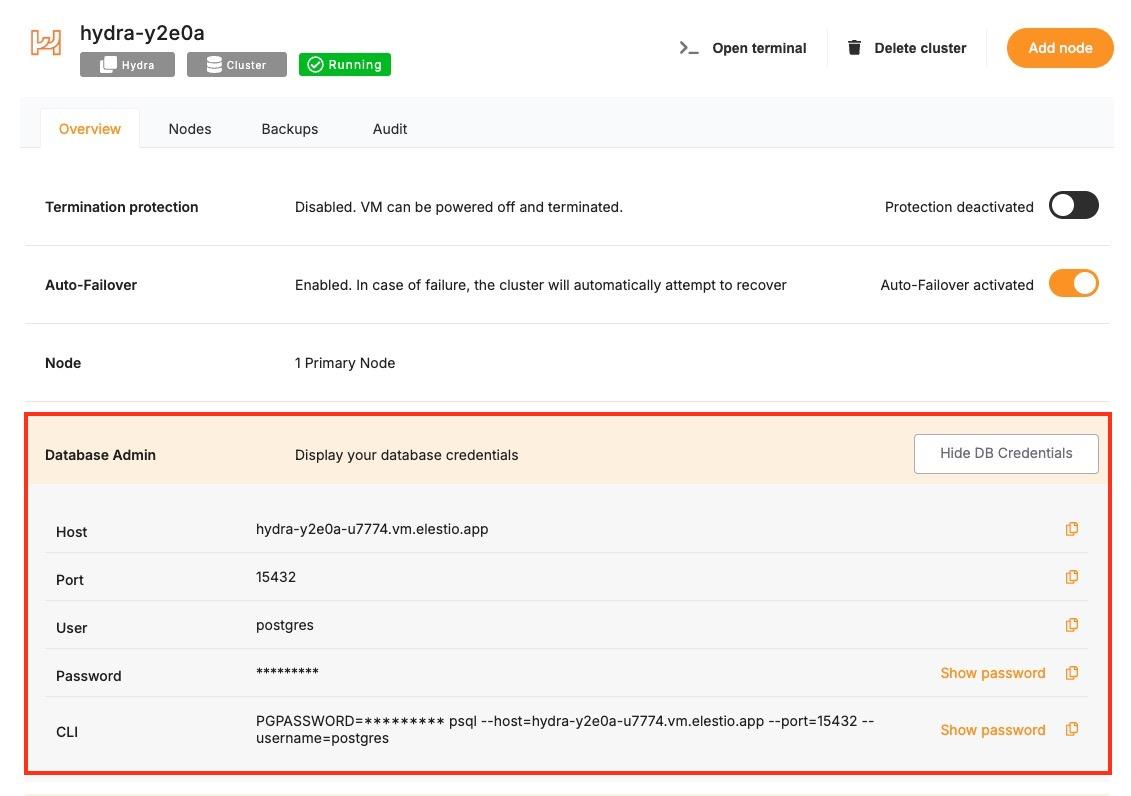](https://docs.elest.io/uploads/images/gallery/2025-05/kHqimage.png)
### **Prerequisites**
- **Install Go**
- Check if Go is installed:
```
go version
```
- - If not, download and install Go: [https://go.dev/dl/](https://go.dev/dl/)
- **Install pq Driver**
```
go get github.com/lib/pq
```
### **Code**
Once all prerequisites are set up, create a new file named `main.go` and add the following code, and replace the `HYDRA_URI` with actual link or in environment setup as you wish:
```go
package main
import (
"database/sql"
"fmt"
"log"
"os"
_ "github.com/lib/pq"
)
func getDBConnection(connStr string) (*sql.DB, error) {
db, err := sql.Open("postgres", connStr)
if err != nil {
return nil, fmt.Errorf("failed to open database connection: %v", err)
}
if err := db.Ping(); err != nil {
return nil, fmt.Errorf("failed to ping database: %v", err)
}
return db, nil
}
func main() {
// Get the Hydra connection string from environment variable
connStr := os.Getenv("HYDRA_URI")
if connStr == "" {
log.Fatal("HYDRA_URI environment variable not set")
}
db, err := getDBConnection(connStr)
if err != nil {
log.Fatal(err)
}
defer db.Close()
query := "SELECT current_database(), current_user, version()"
row := db.QueryRow(query)
var dbName, user, version string
if err := row.Scan(&dbName, &user, &version); err != nil {
log.Fatal("Failed to scan row:", err)
}
fmt.Printf("Connected to Hydra\nDatabase: %s\nUser: %s\nVersion: %s\n", dbName, user, version)
}
```
Set your Hydra URI as an environment variable:
```bash
export HYDRA_URI=postgresql://user:password@host:port/database
```
To execute the script, open the terminal or command prompt and navigate to the directory where `main.go`. Once in the correct directory, run the script with the command
```bash
go run main.go
```
If successful, you’ll see output like:
```bash
Connected to Hydra
Database: elestio
User: postgres
Version: PostgreSQL 14.13 (Debian 14.13-1.pgdg120+1) on x86_64-pc-linux-gnu, compiled by gcc (Debian 12.2.0-14) 12.2.0, 64-bit
```