# Connecting with Python
This guide explains how to connect a Python application to a Hydra database using the `psycopg2-binary` package. It covers environment setup, configuration, and execution of a simple query to test connectivity.
### **Variables**
To connect to a Hydra database, you only need **one environment variable** — the connection URI.
**Variable**
**Description**
**Purpose**
`HYDRA_URI`
Full Hydra (PostgreSQL-compatible) connection string from the Elestio service overview
Provides all credentials and connection details in a single URI
A typical URI format looks like:
```
postgresql://:@:/
```
You can find the details needed in the URI from the **Elestio service overview** details. Copy and replace the variables carefully in the URI example provided above.
[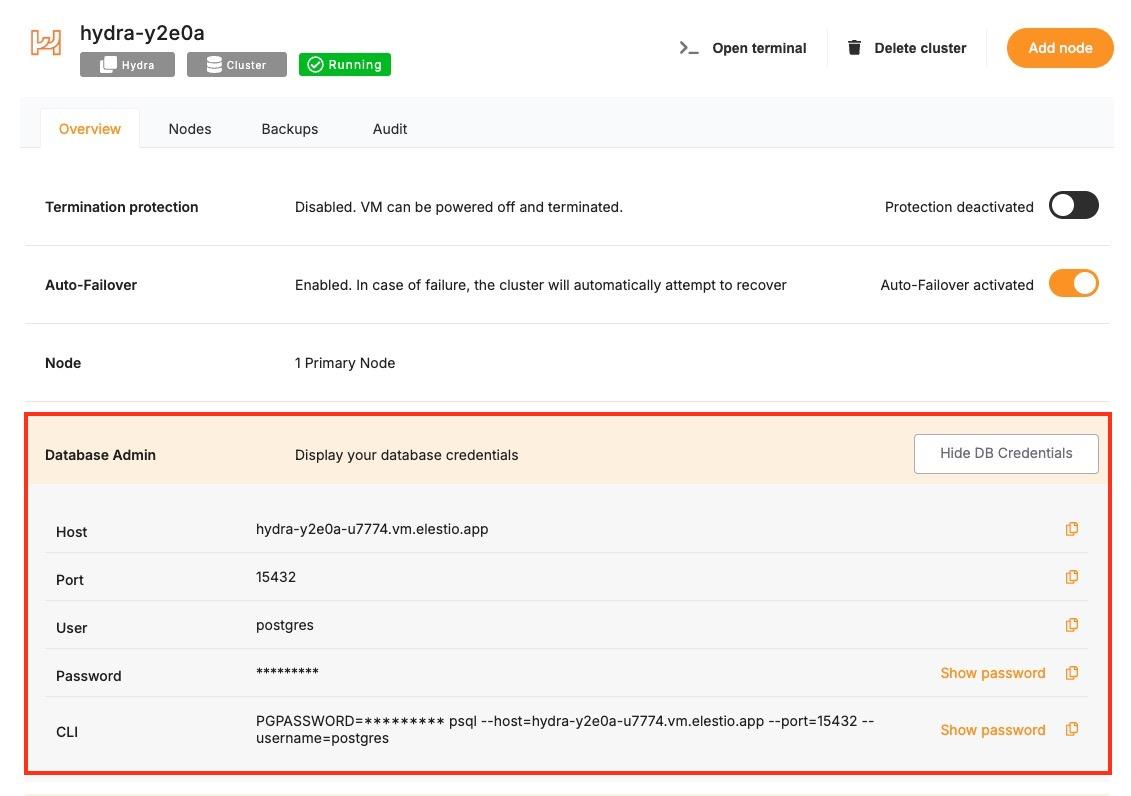](https://docs.elest.io/uploads/images/gallery/2025-05/kHqimage.png)
### **Prerequisites**
**Install Python**
Check if Python is installed:
```
python --version
```
If not installed, download it from [https://python.org](https://python.org).
**Install** `psycopg2-binary`
Install the PostgreSQL driver for Python:
```
pip install psycopg2-binary
```
### **Code**
Once all prerequisites are set up, create a new file named `hydra.py` and add the following code and replace the `HYDRA_URI` with actual link or in environment setup as you wish:
```python
import psycopg2
import os
def get_db_version():
try:
# Use the Hydra URI from environment variable
connection_uri = os.getenv('HYDRA_URI', 'POSTGRESQL_URI')
db_connection = psycopg2.connect(connection_uri)
db_cursor = db_connection.cursor()
db_cursor.execute('SELECT VERSION()')
db_version = db_cursor.fetchone()[0]
return db_version
except Exception as e:
print(f"Database connection error: {e}")
return None
finally:
if 'db_cursor' in locals():
db_cursor.close()
if 'db_connection' in locals():
db_connection.close()
def display_version():
version = get_db_version()
if version:
print(f"Connected to Hydra: {version}")
if __name__ == "__main__":
display_version()
```
> 🔐 **Tip:** Save your URI in an .env file or set it in your terminal session like this:
```bash
export HYDRA_URI=postgresql://user:password@host:port/database
```
To execute the script, open the terminal or command prompt and navigate to the directory where `hydra.py`. Once in the correct directory, run the script with the command
```bash
python hydra.py
```
If the connection is successful, you’ll see:
```
Connected to Hydra: PostgreSQL 14.13 (Debian 14.13-1.pgdg120+1) on x86_64-pc-linux-gnu, compiled by gcc (Debian 12.2.0-14) 12.2.0, 64-bit
```