KeyDB How-To Guides
Create databases, upgrade versions, manage extensions, back up and restore, and tune performance on KeyDB.
Creating a Database
KeyDB is a high-performance fork of Redis that offers multithreading, active-active replication, and enhanced memory management. Setting up KeyDB correctly is essential for achieving low-latency performance and ensuring durability in modern applications. This guide walks through various methods to run and connect to KeyDB: using the KeyDB CLI, running inside Docker containers, and integrating with scripting workflows. It also outlines best practices to follow during configuration and operation.
Creating Using keydb-cli
KeyDB provides a built-in command-line interface tool called keydb-cli. It allows direct interaction with a KeyDB server and supports both local and remote connections. All standard Redis-compatible commands can be executed through this tool, along with extended functionality supported by KeyDB.
Connect to KeyDB:
If you have a local KeyDB instance running, either from a package manager or inside Docker, you can start the CLI with no extra arguments:
keydb-cli
To connect to a remote KeyDB instance, provide the host, port, and authentication details if configured:
keydb-cli -h <host> -p <port> -a <password>
After executing the command, you will be placed in the KeyDB shell, where you can interactively issue commands.
Running KeyDB Using Docker
KeyDB can be containerized using Docker to ensure consistent environments across local development, testing, and production systems. This is a convenient way to isolate dependencies and manage deployment configurations.
Access Elestio Terminal
If you are using Elestio to host your KeyDB service, log in to the Elestio dashboard. Navigate to your KeyDB instance, then open Tools > Terminal. This will provide a browser-based shell within the server environment that has access to your containerized services.
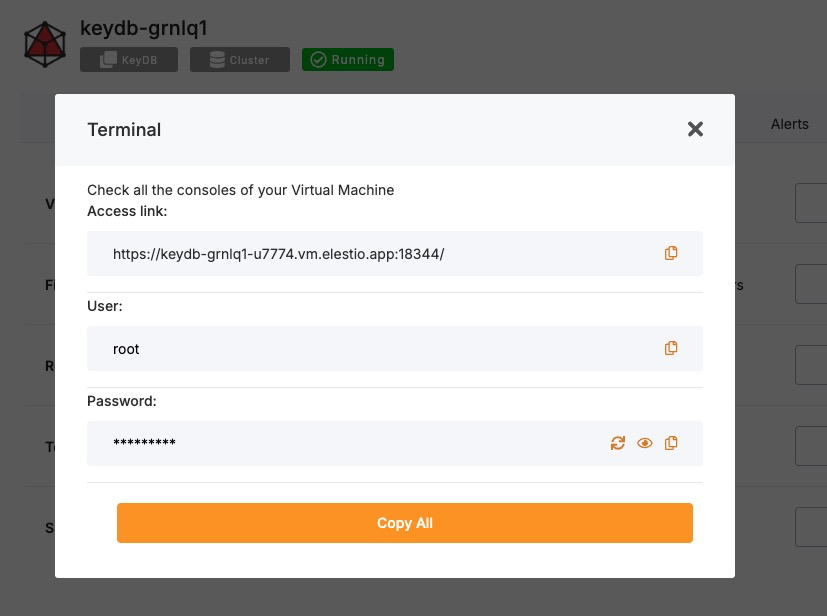
Once inside the terminal, switch to the application directory:
cd /opt/app/
Access the KeyDB Container Shell
Elestio services use Docker Compose for container orchestration. To enter the KeyDB container and interact with its runtime environment, use the following command:
docker-compose exec keydb bash
This starts a bash session inside the running KeyDB container.
Access KeyDB CLI from Within the Container
The keydb-cli tool is available within the container and can be used to run commands directly against the KeyDB server. If authentication is required, supply the password using the -a flag:
keydb-cli -a <password>
You’ll now be connected to the KeyDB instance running inside the container.
Test Connectivity
To confirm the KeyDB instance is functional, run a test by setting and retrieving a key:
set testkey "Hello KeyDB"
get testkey
Expected output:
"Hello KeyDB"
This confirms that read/write operations are working correctly inside the containerized KeyDB environment.
Connecting Using keydb-cli in Scripts
The keydb-cli command can also be used non-interactively, which is useful for shell scripts, cron jobs, or CI/CD workflows that require interaction with the KeyDB server.
To set a key via a script:
keydb-cli -h <host> -p <port> -a <password> SET example_key "example_value"
This will set the specified key in a single command without launching the interactive shell.
Best Practices for Setting Up KeyDB
Use Meaningful Key Naming Conventions
To ensure readability and manageability, adopt consistent naming conventions. Use namespaces separated by colons to logically group related keys:
user:1001:profile
session:2025:token
This simplifies debugging, metric tracking, and migration efforts.
Follow Consistent Data Structures
KeyDB supports Redis-compatible data structures including strings, hashes, sets, sorted sets, lists, and streams. Always choose the most efficient type based on access patterns and data lifecycle. For example, hashes are ideal for storing grouped attributes, while sets work well for unique lists.
Inconsistent structure usage can lead to inefficient memory use and unexpected command behavior.
Enable Authentication and TLS
Security should not be overlooked in production systems. Always configure a strong password using the requirepass directive in keydb.conf. Additionally, enable TLS for encrypted traffic if the database is accessible over the internet or across networks.
Example keydb.conf settings:
requirepass strong_secure_password
tls-port 6379
tls-cert-file /etc/ssl/certs/cert.pem
tls-key-file /etc/ssl/private/key.pem
These settings help secure both access and data transmission.
Configure Persistence Options
KeyDB supports both Redis-style persistence mechanisms: RDB snapshots and AOF logging. These ensure data durability in the event of process restarts or hardware failure.
Recommended settings in keydb.conf:
save 900 1
appendonly yes
appendfsync everysec
Use AOF for greater durability, RDB for faster restarts, or both for a balanced setup.
Monitor and Tune Performance
Monitor performance using built-in KeyDB commands like INFO, MONITOR, and SLOWLOG. These provide insights into memory usage, command execution times, and system health. You can also integrate external monitoring tools like Prometheus, RedisInsight, or Grafana for real-time visualization.
Proper monitoring allows you to proactively tune memory limits, max clients, and replication settings.
Common Issues and Their Solutions
| Issue | Cause | Solution |
|---|---|---|
| NOAUTH Authentication required | Connecting to an instance that requires a password without supplying one | Use the -a flag or send the AUTH command before other commands |
| ERR Client sent AUTH, but no password is set | Authentication is attempted on a server that does not require it | Remove the -a option or check the requirepass directive |
| Cannot connect to KeyDB on ‘localhost’ | The server is not running or bound to another address/port | Check service status and inspect keydb.conf and Docker port mappings |
| Docker KeyDB container refuses connections | Network misconfiguration or the container is still initializing | Use docker-compose logs keydb and verify exposed ports |
| Data not persisted after restart | Persistence settings are disabled | Enable RDB and/or AOF in the configuration file |
Upgrading to Major Version
Upgrading a database service on Elestio can be done without creating a new instance or performing a full manual migration. Elestio provides a built-in option to change the database version directly from the dashboard. This is useful for cases where the upgrade does not involve breaking changes or when minimal manual involvement is preferred. The version upgrade process is handled by Elestio internally, including restarting the database service if required. This method reduces the number of steps involved and provides a way to keep services up to date with minimal configuration changes.
Log In and Locate Your Service
To begin the upgrade process, log in to your Elestio dashboard and navigate to the specific database service you want to upgrade. It is important to verify that the correct instance is selected, especially in environments where multiple databases are used for different purposes such as staging, testing, or production. The dashboard interface provides detailed information for each service, including version details, usage metrics, and current configuration. Ensure that you have access rights to perform upgrades on the selected service. Identifying the right instance helps avoid accidental changes to unrelated environments.
Back Up Your Data
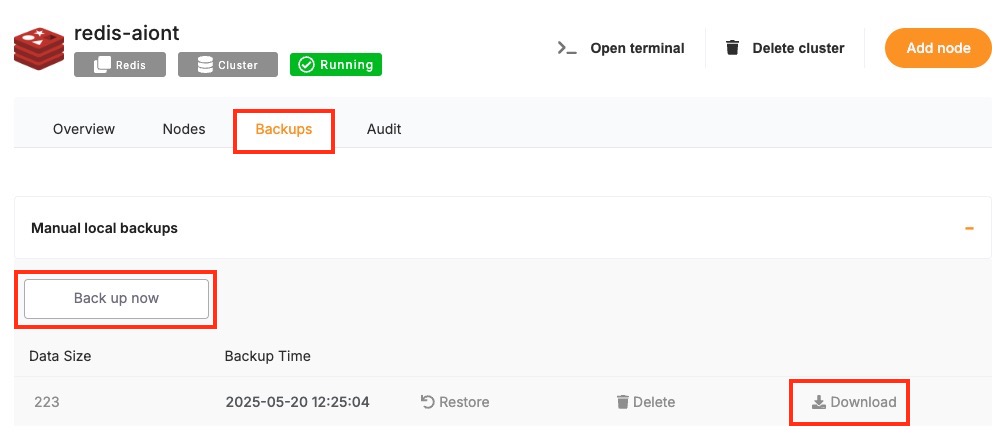
Before starting the upgrade, create a backup of your database. A backup stores the current state of your data, schema, indexes, and configuration, which can be restored if something goes wrong during the upgrade. In Elestio, this can be done through the Backups tab by selecting Back up now under Manual local backups and Download the backup file. Scheduled backups may also be used, but it is recommended to create a manual one just before the upgrade. Keeping a recent backup allows quick recovery in case of errors or rollback needs. This is especially important in production environments where data consistency is critical.
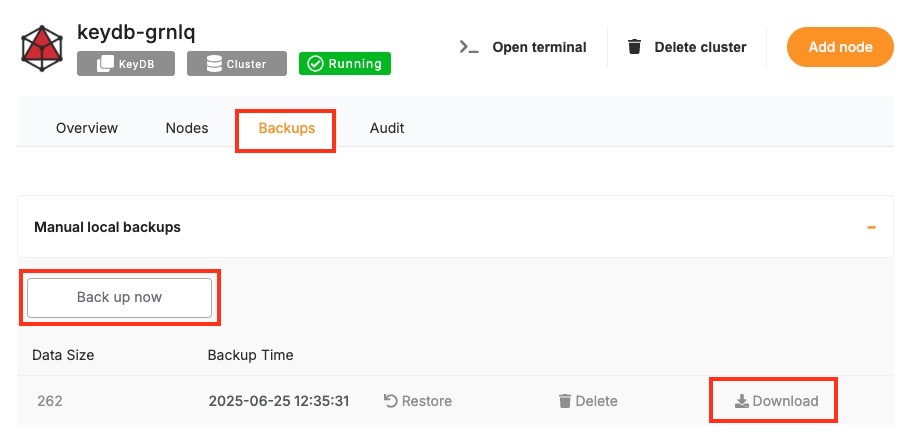
Select the New Version
Once your backup is secure, proceed to the Overview and then Software > Update config tab within your database service page.
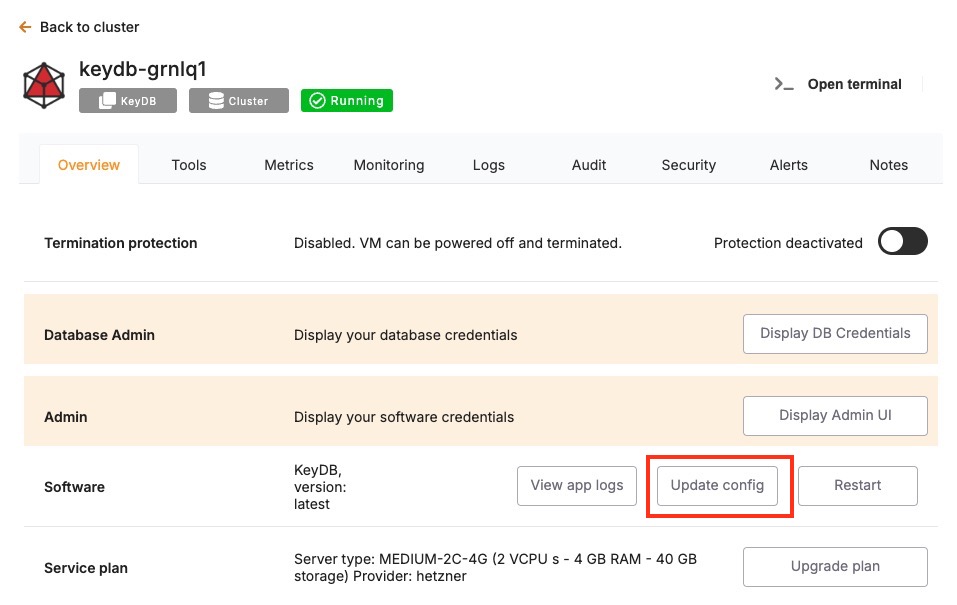
Here, you'll find an option labeled ENV. In the ENV menu, change the desired database version to SOFTWARE_VERSION. After confirming the version, Elestio will begin the upgrade process automatically. During this time, the platform takes care of the version change and restarts the database if needed. No manual commands are required, and the system handles most of the operational aspects in the background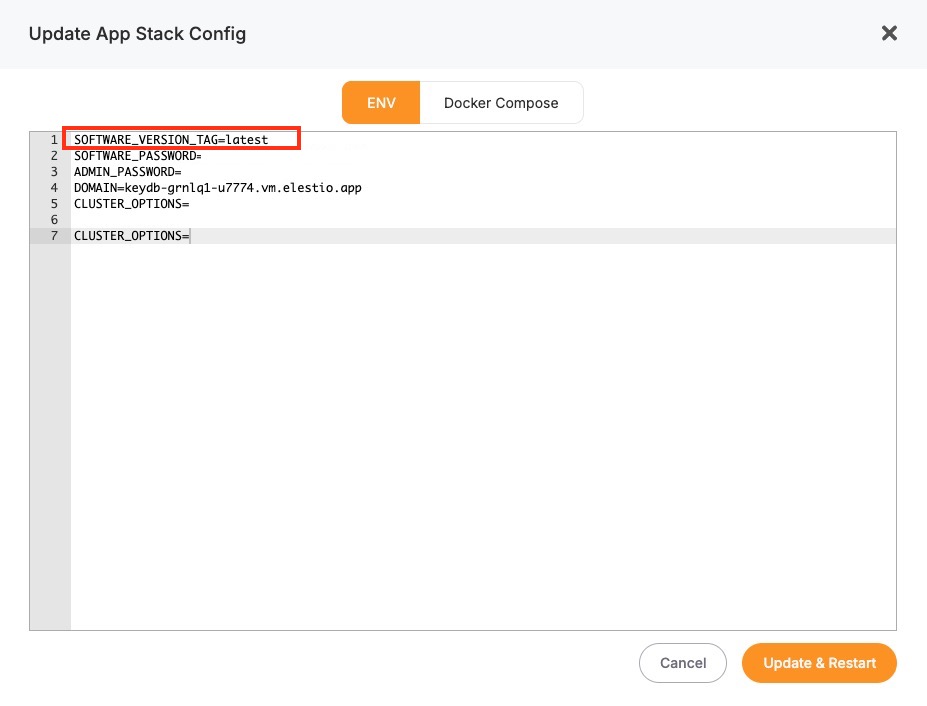
Monitor the Upgrade Process
The upgrade process may include a short downtime while the database restarts. Once it is completed, it is important to verify that the upgrade was successful and the service is operating as expected. Start by checking the logs available in the Elestio dashboard for any warnings or errors during the process. Then, review performance metrics to ensure the database is running normally and responding to queries. Finally, test the connection from your client applications to confirm that they can interact with the upgraded database without issues.
Installing and Updating an Extension
KeyDB supports Redis-compatible modules to extend core database functionality with custom data types, specialized algorithms, and advanced operations. These modules are compiled as shared object (.so) files and must be loaded at server startup. Examples include RedisBloom, RedisJSON, and RedisTimeSeries all of which are supported in KeyDB just as in Redis.
In Elestio-hosted KeyDB instances or any Docker Compose–based setup, modules can be mounted and loaded via configuration in docker-compose.yml. This guide outlines how to install, load, and manage KeyDB modules using Docker Compose, including verification steps, update methods, and best practices.
Installing and Enabling KeyDB Modules
Modules in KeyDB must be loaded at server startup using the --loadmodule directive. These are .so binaries that are typically mounted into the container from the host file system. The process is nearly identical to Redis module integration.
Update docker-compose.yml
To use a module such as RedisBloom in a KeyDB Docker setup, mount the module file and add the --loadmodule directive to the container command.
services:
  keydb:
    image: eqalpha/keydb:latest
    volumes:
      - ./modules/redisbloom.so:/data/redisbloom.so
    command: ["keydb-server", "--loadmodule", "/data/redisbloom.so"]
    ports:
      - "6379:6379"
Here:
- ./modules/redisbloom.so is the local path on your host machine.
- /data/redisbloom.so is the path where the module will be accessible inside the container.
Ensure that the .so file exists locally before running the container.
Restart the KeyDB Service
After updating the Docker Compose configuration, apply changes by restarting the container:
docker-compose down
docker-compose up -d
This reloads KeyDB and ensures the module is initialized during startup.
Verify the Module is Loaded
Once KeyDB is running, connect to the containerized service:
docker-compose exec keydb keydb-cli -a <yourPassword>
Run the following command to check for loaded modules:
MODULE LIST
Expected output (for RedisBloom):
1) 1) "name"
   2) "bf"
   3) "ver"
   4) (integer) 20207
This confirms that the module (in this case, bf for Bloom filters) has been loaded successfully.
Checking Module Availability & Compatibility
KeyDB modules must match the container’s runtime architecture and the KeyDB version. Many Redis modules work out-of-the-box with KeyDB, but always check the official documentation or test in a controlled environment first.
To inspect module metadata and compatibility:
INFO MODULES
To confirm the current KeyDB version and platform:
docker-compose exec keydb keydb-server --version
If a module fails to load, check container logs for detailed error output:
docker-compose logs keydb
Most load failures are caused by missing binaries, unsupported formats, or incorrect file paths.
Updating or Unloading Modules
KeyDB does not support dynamic unloading of modules while the server is running. To update or remove a module, the server must be stopped and restarted with the revised configuration.
Stop the container:
docker-compose down
Edit docker-compose.yml as needed:
- Update the .so path to reference the new module version.
- Remove the --loadmodule line to disable the module entirely.
Start the container again:
docker-compose up -d
Always test updated modules in staging before deploying to production environments.
Troubleshooting Common Module Issues
| Issue | Cause | Resolution |
|---|---|---|
| KeyDB fails to start | Invalid module path or incompatible binary | Check docker-compose logs keydb and verify path and architecture |
| MODULE command not recognized | Image does not include module support | Use an image like eqalpha/keydb or eqalpha/keydb:alpine |
| “Can’t open .so file” error | Volume not mounted or file permission denied | Confirm that the .so file exists and has readable permissions |
| Module not listed in MODULE LIST | Silent module load failure | Review container logs and validate command syntax |
| Module commands not recognized | Module did not load correctly | Ensure Redis version and module binary compatibility |
Security Considerations
Modules execute native code within the KeyDB process and inherit its permissions. As such, only load trusted .so files compiled from official or reviewed source code. Avoid uploading or using third-party binaries without auditing. In Elestio-managed or containerized environments, use Docker’s file and user isolation to reduce risk:
- Set read-only permissions on mounted .so files.
- Use non-root users inside containers when possible.
- Monitor module behavior with SLOWLOG, INFO, and command auditing.
Improperly configured or malicious modules can cause crashes, memory leaks, or worse. Treat modules as privileged extensions and keep them versioned and tested across environments.
Creating Manual Backups
Regular backups are essential when running a KeyDB deployment, especially if you’re using it for persistent workloads. While Elestio provides automated backups for managed services by default, you may still want to create manual backups before major configuration changes, retain local archives, or test automation workflows. This guide covers several methods for creating KeyDB backups on Elestio via the dashboard, CLI, or Docker Compose. It also explains retention strategies and automated backups using cron jobs.
Manual Service Backups on Elestio
If you’re using Elestio’s managed KeyDB service, the simplest and most reliable way to perform a full backup is through the Elestio dashboard. This creates a backup of your current KeyDB dataset and stores it in Elestio’s infrastructure. These backups can later be restored directly from the dashboard, which is helpful when testing configuration changes or performing disaster recovery.
To trigger a manual KeyDB backup on Elestio:
- Log in to the Elestio dashboard.
- Navigate to your KeyDB service or cluster.
- Click the Backups tab in the service menu.
- Choose Back up now to generate a manual backup.
Manual Backups Using Docker Compose
For KeyDB instances deployed using Docker Compose (e.g., in Elestio self-hosted environments), you can create manual backups by copying the internal persistence files—RDB snapshots and optionally AOF logs.
Access Elestio Terminal
From the Elestio dashboard:
- Go to your deployed KeyDB service.
- Navigate to Tools > Terminal and authenticate.
Locate the KeyDB Container Directory
cd /opt/app/
This is the standard project directory on Elestio-managed hosts where your docker-compose.yml file resides.
Trigger an RDB Snapshot (Optional)
By default, KeyDB creates periodic snapshots based on configuration. To force an immediate one:
docker-compose exec keydb keydb-cli SAVE
This generates a dump.rdb file in the container’s /data directory.
Copy Backup Files from the Container
Use docker cp to extract the RDB snapshot file (and AOF if enabled) to your host machine:
docker cp $(docker-compose ps -q keydb):/data/dump.rdb ./backup_$(date +%F).rdb
If AOF persistence is enabled (appendonly yes in keydb.conf), back it up as well:
docker cp $(docker-compose ps -q keydb):/data/appendonly.aof ./appendonly_$(date +%F).aof
You now have point-in-time backups that can be restored later.
Backup Storage & Retention Best Practices
KeyDB backup files can be small (RDB) or large (AOF), depending on data size and write frequency. It’s important to manage them properly.
Recommendations:
- Use clear, timestamped names like keydb_backup_2025_06_24.rdb.
- Store backups off-site or in the cloud (e.g., S3, Backblaze, or a secure remote server).
- Retention policy: Keep 7 daily, 4 weekly, and 3–6 monthly backups.
- Automate old backup cleanup with cron or shell scripts.
- Optionally compress with gzip, xz, or zstd.
Automating KeyDB Backups (cron)
To automate KeyDB backups, use cron to schedule daily backup tasks on Linux servers. This helps maintain consistency and reduces the chance of human error.
Example: Daily Backup at 3 AM
Edit your crontab:
crontab -e
Add the following entry:
0 3 * * * docker-compose -f /opt/app/docker-compose.yml exec keydb keydb-cli SAVE && \
docker cp $(docker-compose -f /opt/app/docker-compose.yml ps -q keydb):/data/dump.rdb /backups/keydb_backup_$(date +\%F).rdb
Make sure /backups/ exists and has write permissions for the cron user.
Optional Compression + Upload
You can compress the file and upload it to cloud storage in the same cron job:
gzip /backups/keydb_backup_$(date +\%F).rdb
rclone copy /backups/ remote:daily-keydb-backups
Backup Format and Restore Notes
| Format | Description | Restore Method |
|---|---|---|
| dump.rdb | Binary snapshot of full dataset | Stop KeyDB, replace dump.rdb, and restart the container |
| appendonly.aof | Command log (if enabled) | Stop KeyDB, replace AOF file, and restart the container |
To Restore a Backup:
See Elestio’s Redis restore guide, which applies to KeyDB as well:
- Stop KeyDB:
docker-compose down
- Replace the backup file in your volume mount (e.g., /data/dump.rdb or appendonly.aof).
- Restart the service:
docker-compose up -d
Restoring a Backup
Restoring KeyDB backups is critical for disaster recovery, staging environment replication, or rolling back to a known good state. Elestio supports restoration via its web dashboard and manual methods using Docker Compose and command-line tools. This guide covers how to restore KeyDB backups from RDB or AOF files, for both full and partial restore scenarios, and includes fixes for common errors during the process.
Restoring from a Backup via Terminal
This method assumes you already have a backup file such as dump.rdb or appendonly.aof. Restoring involves stopping the container, replacing the data file(s), and restarting KeyDB so it can load the new data at boot time.
Stop the KeyDB Container
Cleanly stop the container to prevent data corruption:
docker-compose down
Replace the Backup File
Move the desired backup file into the volume directory that maps to the KeyDB container’s /data.
Example for RDB:
cp ./backup_2025_06_24.rdb /opt/app/data/dump.rdb
Ensure your docker-compose.yml contains the correct volume mapping:
volumes:
  - ./data:/data
For AOF-based persistence:
cp ./appendonly_2025_06_24.aof /opt/app/data/appendonly.aof
Restart KeyDB
Bring the container back up:
docker-compose up -d
KeyDB will automatically load dump.rdb or appendonly.aof depending on its configuration in keydb.conf or Docker entrypoint.
Restoring via Docker Compose Terminal
If you prefer working inside the container environment, you can directly inject the backup file into the KeyDB container using Docker commands.
Copy the Backup File into the Container
For RDB:
docker cp ./backup_2025_06_24.rdb $(docker-compose ps -q keydb):/data/dump.rdb
For AOF:
docker cp ./appendonly_2025_06_24.aof $(docker-compose ps -q keydb):/data/appendonly.aof
Restart the KeyDB Container
docker-compose restart keydb
KeyDB will now reload the updated data file(s) during startup.
Partial Restores in KeyDB
KeyDB, like Redis, does not support partial data restoration out of the box. However, workarounds exist to selectively restore key-value pairs or subsets of data.
Restore Selected Keys via CLI
If you’ve exported a list of keys and their values, you can restore them using a script with keydb-cli:
cat keys_to_restore.txt | while read key; do
  value=$(cat dump.json | jq -r ".\"$key\"")
  keydb-cli SET "$key" "$value"
done
This method is useful when working with pre-filtered exports in JSON, CSV, or key dumps
Restore from a Partial AOF
If your backup is a trimmed-down AOF file (e.g., created by filtering certain operations), KeyDB will replay it entirely at startup:
- Replace the existing appendonly.aof file.
- Restart the container.
- KeyDB will process only the included operations, effectively performing a partial restore.
Common Errors & How to Fix Them
Restoring KeyDB may occasionally fail due to configuration mismatches, permission issues, or corrupted backup files. Below are common errors and their solutions.
1. NOAUTH Authentication Required
Error:
(error) NOAUTH Authentication required.
Cause: The KeyDB instance requires authentication for any CLI interaction.
Fix:
keydb-cli -a yourpassword
In scripts:
keydb-cli -a "$KEYDB_PASSWORD" < restore_script.txt
2. KeyDB Fails to Start After Restore
Error:
Fatal error loading the DB: Invalid RDB format
Cause: The backup file is corrupted or incompatible with the KeyDB version.
Fix:
- Make sure the backup was created with the same or compatible KeyDB version.
- If necessary, downgrade or upgrade the container image to match the backup version.
3. Data Not Restored
Cause: KeyDB is configured to use a different persistence method than the one you restored.
Fix:
Check your persistence mode in keydb.conf or Docker entry:
appendonly yes    # for AOF
appendonly no     # for RDB
Ensure the right file (dump.rdb or appendonly.aof) exists at /data.
4. Permission Denied When Copying Files
Error:
cp: cannot create regular file ‘/opt/app/data/dump.rdb’: Permission denied
Fix:
Use sudo if your shell user doesn’t have write access:
sudo cp ./backup_2025_06_24.rdb /opt/app/data/dump.rdb
Or adjust directory permissions:
sudo chown $USER:$USER /opt/app/data
Identifying Slow Queries
Slow commands can impact KeyDB performance, especially under high concurrency or when inefficient data access patterns are used. Whether you’re running KeyDB on Elestio via the dashboard, inside a Docker Compose setup, or accessing it through the CLI, KeyDB includes powerful introspection tools like the slow log and latency tracking.
This guide shows how to detect slow operations using KeyDB’s built-in slowlog, analyze latency issues, and optimize performance through configuration tuning and query best practices.
Inspecting Slow Commands from the Terminal
KeyDB supports the Redis-compatible SLOWLOG feature to record commands that exceed a configured execution time threshold. These logs are useful to spot expensive operations and server stalls.
Connect to Your KeyDB Instance via Terminal
Use keydb-cli or redis-cli to connect to your KeyDB instance:
keydb-cli -h <host> -p <port> -a <password>
Replace <host>, <port>, and <password> with the credentials available in your Elestio dashboard.
View the Slowlog Threshold
Check what execution time (in microseconds) is considered “slow”:
CONFIG GET slowlog-log-slower-than
The default is 10000 (10 milliseconds). Commands slower than this will be logged.
View the Slow Query Log
To retrieve recent slow operations:
SLOWLOG GET 10
This shows the 10 most recent slowlog entries, each with:
- The command that was executed
- The timestamp
- Execution duration in microseconds
- Any arguments passed to the command
Analyzing Inside Docker Compose
If you’re running KeyDB via Docker Compose, you can inspect slow queries from within the container environment.
Access the KeyDB Container
Launch a shell in your container:
docker-compose exec keydb bash
Connect to KeyDB using:
keydb-cli -a $KEYDB_PASSWORD
Ensure that REDIS_PASSWORD (or KEYDB_PASSWORD) is defined in your .env file or Compose environment variables.
Adjust Slowlog Settings
You can view or modify the slowlog threshold dynamically:
CONFIG SET slowlog-log-slower-than 5000
This temporarily changes the threshold to 5 milliseconds, which is useful for debugging under lower latency conditions.
Increase the Number of Stored Entries
Check how many slowlog entries are retained:
CONFIG GET slowlog-max-len
To store more slowlog entries:
CONFIG SET slowlog-max-len 256
This helps in long-running investigations or during load testing.
Using the Latency Monitoring Feature
KeyDB inherits Redis’s latency monitoring tools, providing additional insights beyond command duration as fork stalls, I/O blocks, or memory pressure.
Enable Latency Monitoring
Latency tracking is often enabled by default. Run:
LATENCY DOCTOR
This provides a high-level diagnostic report of system latency spikes and potential root causes, including slow commands, AOF rewrites, and blocking operations.
View Latency History for Specific Events
Track the latency of specific operations like:
LATENCY HISTORY command
Other event categories include:
- fork – Background save or AOF rewrite delays
- aof-write – Append-only file sync lag
- command – General command execution delays
Understanding and Resolving Common Bottlenecks
KeyDB performance can degrade due to specific patterns of usage, large keys, blocking commands, or non-optimized pipelines.
Common Causes of Slowness
- Large keys: Commands like LRANGE, SMEMBERS, or HGETALL on large datasets.
- Blocking commands: Such as BLPOP, BRPOP, or long-running Lua scripts.
- Forking delays: Caused by SAVE or AOF background rewriting.
Best Practices for Performance
- Use SCAN instead of KEYS to iterate large keyspaces safely.
- Limit range queries: Use LRANGE 0 99 instead of fetching full lists.
- Enable pipelining: Reduce round trips by batching commands.
- Avoid multi-key ops: Especially in clustered deployments, where they can cause performance issues or fail.
Optimizing with Configuration Changes
KeyDB performance can be significantly tuned by adjusting memory and persistence-related settings.
Common Tuning Examples
CONFIG SET maxmemory-policy allkeys-lru
CONFIG SET save ""
These adjust eviction and persistence behaviours. Use these with caution:
- Disabling RDB/AOF improves speed but removes durability.
- LRU/TTL policies control memory usage under load.
Detect and terminate long-running queries
Optimizing memory usage in KeyDB is essential for maintaining performance, especially in production environments like Elestio. Without proper memory control, large datasets, long-lived keys, or inefficient operations can lead to high memory pressure, slowdowns, or even server crashes. This guide explains how to optimize memory usage, monitor for memory-related issues, and configure automatic cleanup using Docker Compose environments.
Understanding KeyDB Memory Behavior
KeyDB allocates memory based on data structure usage and background operations like persistence or replication. It is important to monitor key memory indicators such as used memory, memory fragmentation, peak memory, and memory policy to understand how your instance behaves under load.
Monitoring KeyDB Memory in Real Time
To inspect memory statistics from the command line, use the INFO MEMORY command:
keydb-cli -a <password> INFO MEMORY
This command returns a detailed report including used_memory, used_memory_rss, mem_fragmentation_ratio, and maxmemory. A high fragmentation ratio may indicate inefficient memory usage or a need to tune your allocator.
If you are running KeyDB in a Docker Compose environment, connect to the container first:
docker-compose exec keydb bash
Once inside, run:
keydb-cli -a $KEYDB_PASSWORD
This gives you full access to execute monitoring and configuration commands.
Setting Maximum Memory and Eviction Policy
To avoid out-of-memory errors, it is crucial to set a memory cap and enable eviction. Edit your keydb.conf or set these at runtime:
CONFIG SET maxmemory 512mb
CONFIG SET maxmemory-policy allkeys-lru
The maxmemory setting defines the upper limit of memory usage. The maxmemory-policy determines how keys are evicted when that limit is reached. Recommended policies include:
allkeys-lru: Evicts the least recently used keys across all keysvolatile-lru: Evicts LRU keys with expiration setnoeviction: Rejects writes when memory is full (not recommended in production)
Analyzing Memory Usage with MEMORY STATS
Use the built-in MEMORY STATS command for a high-level breakdown of memory usage by component:
MEMORY STATS
This provides statistics on memory overhead, allocator efficiency, and usage by data structure types.
Cleaning Up Expired or Unused Keys
Expired keys in KeyDB are removed passively upon access or through background expiration cycles. To force cleanup manually or test expiration behavior:
MEMORY PURGE
This clears internal allocator caches and triggers background memory cleanup without deleting live keys. Use this cautiously in production environments.
Listing Keys Consuming the Most Memory
You can use the MEMORY USAGE command to inspect which keys consume the most memory. For example:
MEMORY USAGE mykey
To automate finding the top memory-consuming keys, use a loop with SCAN and MEMORY USAGE:
SCAN 0 COUNT 100
Then evaluate MEMORY USAGE per key manually or using a script.
Best Practices for KeyDB Memory Management
Minimize memory pressure by following these recommendations:
- Avoid large keys: Break large values into smaller hashes or lists to reduce memory footprint and allow efficient partial retrieval.
- Expire non-essential keys: Always set TTLs on cache data or temporary states using
EXPIREorSETEX. - Avoid full dataset scans: Replace commands like
KEYS *withSCANto prevent memory spikes. - Limit big lists or sets: Use commands like
LRANGE mylist 0 99instead of fetching entire datasets withLRANGE mylist 0 -1. - Use lazy data loading: Design applications to load only required data in batches.
Monitoring Memory Growth Over Time
Track historical memory usage using the INFO MEMORY and LATENCY DOCTOR commands periodically, and export metrics to Prometheus or another monitoring system if needed.
Consider integrating KeyDB with monitoring tools like:
- Grafana with Prometheus Exporter
- Elestio’s built-in monitoring agent
These help you visualize and react to memory growth trends in real time.
Optimizing KeyDB’s memory usage is essential to running reliable, responsive services. By configuring maxmemory, choosing an appropriate eviction policy, monitoring key memory metrics, and cleaning up expired data, you can ensure predictable performance under load. Combine these strategies with external monitoring for long-term stability in Docker Compose environments like Elestio.
Preventing Full Disk
Running out of disk space in a KeyDB environment can result in failed writes, background save errors, and degraded availability. KeyDB, like Redis, uses disk storage for persistence (RDB and AOF), temporary files, and logs especially when persistence is enabled. On managed hosting platforms like Elestio, while infrastructure maintenance is handled, it is up to the user to monitor disk space, configure retention settings, and perform regular cleanups. This guide walks through how to monitor disk usage, configure alerts, remove unnecessary data, and apply best practices for avoiding full disk issues in a KeyDB setup under Docker Compose.
Monitoring Disk Usage
Disk usage monitoring helps identify abnormal growth patterns and prevents outages due to insufficient storage. In Docker Compose environments, both host-level and container-level monitoring are essential.
Inspect the host system storage
Run the following command on the host to check overall disk usage and determine which mount point is filling up:
df -h
This displays disk usage statistics across volumes. Locate the mount point corresponding to your KeyDB data volume—typically something like /var/lib/docker/volumes/keydb_data/_data.
Check disk usage from inside the container
To get insight into the container’s internal disk usage, first enter the container shell:
docker-compose exec keydb sh
Once inside the container, assess the size of the data directory with:
du -sh /data
This reveals the total size used by KeyDB data files, such as appendonly.aof, dump.rdb, and temporary files. You can also list file-level details with:
ls -lh /data
This helps identify which files are occupying the most space.
Configuring Alerts and Cleaning Up Storage
Monitoring disk usage is not enough; you must also set up alerts and take action to reclaim space. On the host system, analyze Docker resource usage with:
docker system df
This provides insights into how much space is consumed by images, volumes, and containers.
Identify unused Docker volumes
To list all volumes on the host, run:
docker volume ls
If you find a volume that is unused and safe to delete, remove it with:
docker volume rm <volume-name>
Make sure you do not delete the volume mapped to your KeyDB data directory unless it is backed up and verified to be unused.
Trigger AOF file compaction
When using AOF persistence, the append-only file may grow large over time. You can reduce its size by triggering a background rewrite:
docker-compose exec keydb keydb-cli BGREWRITEAOF
This creates a compacted version of the AOF file with the same dataset.
Clean up old snapshots
RDB snapshots accumulate over time if not managed. They are stored in the /data directory inside the container. To list them, run:
docker-compose exec keydb ls -lh /data
Remove old .rdb files with:
docker-compose exec keydb rm /data/dump-<timestamp>.rdb
Ensure that any snapshot you remove is not needed for recovery.
Managing and Optimizing Temporary Files
KeyDB creates temporary files during fork operations, such as when saving snapshots or rewriting AOF files. These are typically stored in /tmp inside the container.
Monitor temporary file usage
You can inspect the size of the temporary directory with:
docker-compose exec keydb du -sh /tmp
If this directory becomes full, forked operations like BGSAVE or BGREWRITEAOF may fail. To mitigate this, you can change the temporary directory path in keydb.conf to use a volume-backed location like /data:
dir /data
Restart the container after making this configuration change.
Best Practices for Disk Space Management
Effective disk space management in KeyDB depends on adopting a forward-looking configuration and consistent housekeeping.
Avoid storing large binary blobs directly in KeyDB. Instead, keep files like PDFs, images, and other large media in external object storage and only store metadata or keys in KeyDB.
If persistence is not required, disable it entirely to reduce disk usage. This is useful for cache-only workloads:
appendonly no
save ""
To avoid uncontrolled AOF file growth, configure rewrite thresholds in keydb.conf:
auto-aof-rewrite-percentage 100
auto-aof-rewrite-min-size 64mb
Set up log rotation if your container logs to files such as /var/log/keydb/keydb-server.log. This can be managed using logrotate on the host system, or via Docker logging options in docker-compose.yml:
logging:
  driver: "json-file"
  options:
    max-size: "10m"
    max-file: "3"
Always use TTLs for cache or session keys to avoid indefinite storage growth. For example:
SET session:<id> "data" EX 3600
Track memory and persistence statistics with:
docker-compose exec keydb keydb-cli INFO memory
docker-compose exec keydb keydb-cli INFO persistence
Backup files stored in /data should be offloaded to a remote location. Use Elestio’s built-in backup options or mount a dedicated remote volume using your docker-compose.yml to ensure backups do not consume host disk space indefinitely.
Checking Database Size and Related Issues
As your KeyDB data grows especially when using persistence modes like RDB or AOF—it’s essential to monitor how disk and memory resources are consumed. Uncontrolled growth can result in full disks, write failures, longer restarts, and issues with snapshot backups. While Elestio handles infrastructure hosting, managing storage cleanup and optimization is the user’s responsibility. This guide shows how to inspect keyspace usage, analyze persistence files, detect memory bloat, and tune your KeyDB deployment under Docker Compose.
Checking Keyspace Usage and Persistence File Size
Like Redis, KeyDB doesn’t have schemas or tables but provides insights through built-in commands and memory metrics.
Check total memory used by KeyDB
Connect to the container:
docker-compose exec keydb keydb-cli INFO memory
Look at used_memory_human and maxmemory to understand current usage and configured limits.
Inspect key count and TTL stats
docker-compose exec keydb keydb-cli INFO keyspace
You’ll see entries like:
db0:keys=2400,expires=2100,avg_ttl=36000000
This helps identify how many keys are temporary and whether the dataset will grow indefinitely.
View on-disk file sizes
KeyDB writes persistence files to /data inside the container:
docker-compose exec keydb sh -c "ls -lh /data"
Check the size of dump.rdb, appendonly.aof, and any temporary files.
Detecting Bloat and Unused Space
KeyDB supports Redis commands and adds multithreading, but it can still suffer from memory inefficiencies if not monitored properly.
Estimate memory usage by key pattern
docker-compose exec keydb keydb-cli --bigkeys
This reveals large keys by data type, helping you spot high-memory structures like oversized lists or sets.
Analyze memory per key (manual sample)
docker-compose exec keydb keydb-cli MEMORY USAGE some:key
This helps profile storage-heavy keys by prefix or type.
Check memory fragmentation
docker-compose exec keydb keydb-cli INFO memory | grep fragmentation
If mem_fragmentation_ratio is over 1.2, it may indicate inefficient memory allocation.
Optimizing and Reclaiming KeyDB Storage
Once you’ve identified bloated memory areas or oversized persistence files, you can apply optimizations.
Compact the AOF file
docker-compose exec keydb keydb-cli BGREWRITEAOF
This rewrites and reduces the size of appendonly.aof.
Delete unused keys or apply TTLs
docker-compose exec keydb keydb-cli DEL obsolete:key
docker-compose exec keydb keydb-cli EXPIRE session:1234 3600
To bulk-delete keys by pattern (use with caution):
docker-compose exec keydb keydb-cli --scan --pattern "temp:*" | xargs -n 100 keydb-cli DEL
Configure eviction policies
In your mounted keydb.conf:
maxmemory 1gb
maxmemory-policy allkeys-lru
Restart the container to apply these changes. This ensures automatic cleanup when memory thresholds are exceeded.
Managing and Optimizing KeyDB Files on Disk
KeyDB stores its persistent data under /data, which should be volume-mapped on the host system.
Check disk usage
docker system df
List all Docker volumes:
docker volume ls
Check usage for KeyDB volume:
sudo du -sh /var/lib/docker/volumes/<volume_name>/_data
Clean up RDB snapshots and backups
If using RDB snapshots, old .rdb files can be removed:
docker-compose exec keydb rm /data/dump-<timestamp>.rdb
Always offload backups to external storage rather than keeping them on the live host.
Best Practices for KeyDB Storage Management
- Use TTLs on non-permanent keys: Set expiration on cache/session data to avoid unbounded key growth.
- Avoid storing binary files in KeyDB: Keep large files (images, documents, etc.) in object storage. Use KeyDB only for metadata.
- Rotate container logs: In your docker-compose.yml:
logging:
  driver: "json-file"
  options:
    max-size: "10m"
    max-file: "3"
- Use compact data structures: Favor HASH, SET, or ZSET over storing entire JSON blobs as STRING.
- Monitor and control AOF size: Configure AOF rewrite frequency in keydb.conf:
auto-aof-rewrite-percentage 100
auto-aof-rewrite-min-size 64mb
- Archive old analytical data: Periodically move old metrics, logs, or time-series entries to cold storage.
- Externalize backups: Use Elestio’s backup features or configure external volumes/cloud storage to avoid accumulating snapshots on the same disk used for live data.