Custom domain and automated encryption (SSL/TLS)
Prerequisites
If the firewall is enabled on your service, ensure that port 80 is open. This is required for SSL certificate creation and renewal.
Accessing the Configuration
-
Go to the Overview tab of your service dashboard.
-
Locate the Custom Domain Names section inside the Domain Management tab.
-
Click Manage Domains.

In this section, you will have two ways to configure custom domains.
Method 1: Manual DNS Setup
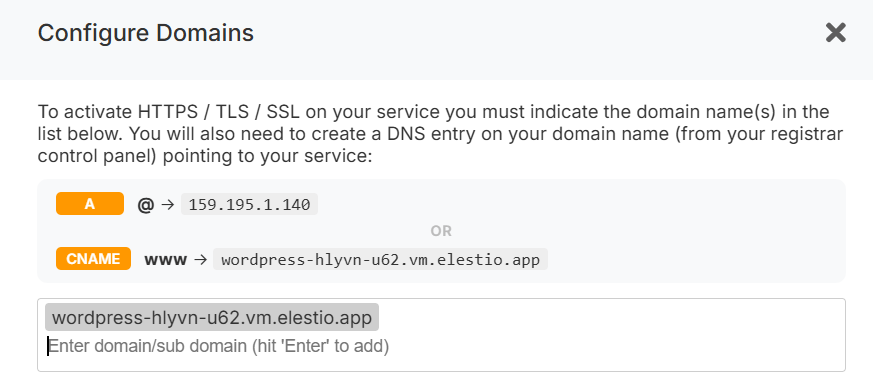
-
In this step, enter your domain and press Enter to add it to the list of authorized domains.
-
Configure DNS records in your domain registrar panel.
Required DNS Records
-
A record:
@→<service IPv4>
(Points the root domain to your service IP) -
CNAME record:
www→<service CNAME>
(Recommended remains stable even if your IP changes, e.g., after migration.)
-
Verify DNS propagation using a tool like: https://dnschecker.org/
Once propagation is complete, the SSL certificate will be automatically generated and renewed, and HTTPS will start working.
Method 2: One-Click DNS Setup via Cloudflare (Domain Connect)
A One-click DNS Setup section is available if the domain name server or registrar is Cloudflare, allowing automatic DNS configuration via the Domain Connect protocol.
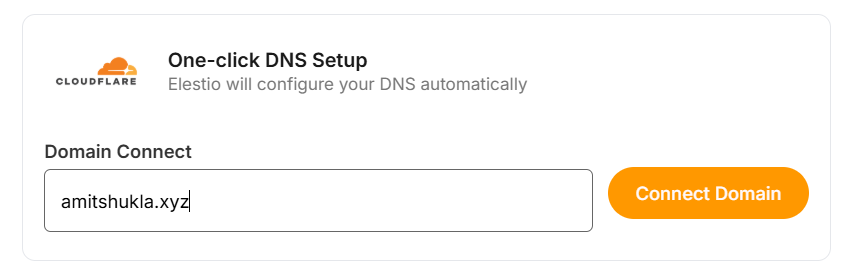
Steps
-
Enter your domain (e.g.
example.com). -
Click Connect Domain.
-
This action will redirect you to the Cloudflare dashboard for accepting the DNS record configuration.
Environment Variable Update
Some applications require updating an environment variable to reflect the configured domain.

To update:
-
Go to the Overview page of your service.
-
Click the Update Config tab in the software row.
-
Open the Env tab.
-
Update the domain-related environment variable.
Cloudflare Reverse Proxy Users
If you are using method 1 and want Cloudflare with the proxy enabled (orange cloud icon), refer to the detailed guide:
https://docs.elest.io/books/security/page/using-cloudflare
Troubleshooting: SSL Not Generated
View Nginx Logs
You can inspect logs using a terminal command:
cd /opt/elestio/nginx;
docker-compose logs -f;
Press Ctrl + C to stop live log output.
Reset SSL Data Folder
In some cases, the SSL data directory /opt/elestio/nginx/ssl_data may become corrupted:
To fix:
-
Connect to your service via terminal.
-
Run the below command.
cd /opt/elestio/nginx/;
docker-compose down;
mv ./ssl_data/ ./ssl_data_old/;
mkdir ./ssl_data/;
chmod 777 ./ssl_data/;
docker-compose up -d
Once executed, just open your custom website URL again, and your certificate should be generated and your site served over SSL/TLS.