# Network Firewall

<p class="callout success">By default, we only open the ports necessary for the application you have deployed. </p>

#### How can I restrict access to my service by IP address?

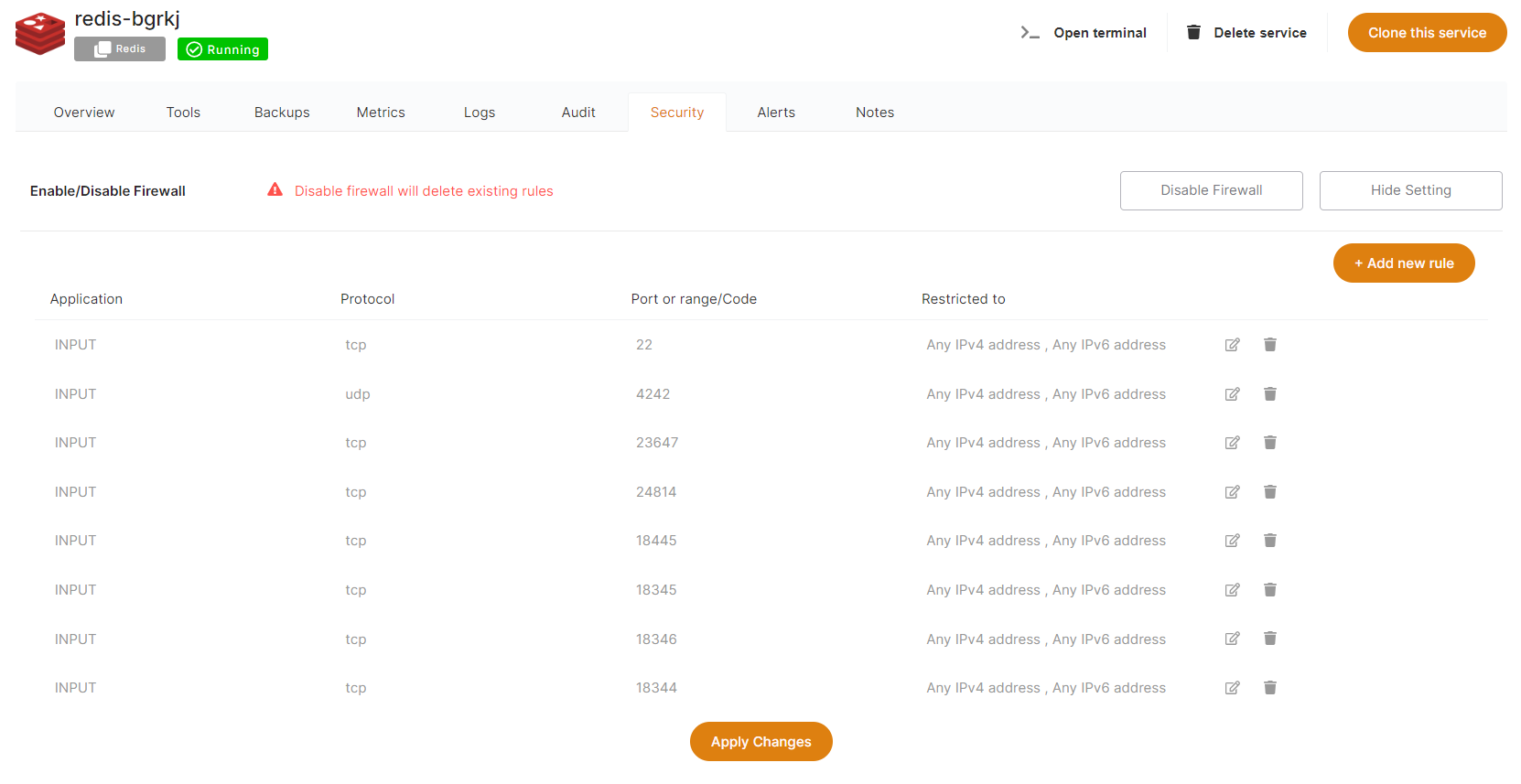
From the Dashboard, select "***Security"***, then "***Show Settings"*** on the Firewall row

[![Screenshot 2022-09-29 163646.png](https://docs.elest.io/uploads/images/gallery/2022-09/screenshot-2022-09-29-163646.png)](https://docs.elest.io/uploads/images/gallery/2022-01/image-1643092204220.png)

From there you can modify, remove, or add new rules to open a port from your service to the internet (or just to a specific target IP).

<p class="callout info">All services come preconfigured with firewall rules that match the software you are deploying.</p>

> You have to keep port 80 open to any ipv4/ipv6 or else Letsencrypt won't be able to generate an SSL certificate.


##### Here is a compilation of the ports necessary for Elestio Automation:

<table border="1" id="bkmrk-mandatory-applicatio" style="border-collapse: collapse; width: 99.2593%; height: 236.296px;"><colgroup><col style="width: 12.5739%;"></col><col style="width: 12.5739%;"></col><col style="width: 25.0233%;"></col><col style="width: 25.0233%;"></col><col style="width: 25.0233%;"></col></colgroup><tbody><tr style="height: 29.537px;"><td class="align-center" style="height: 29.537px;">**Mandatory**</td><td class="align-center" style="height: 29.537px;">**Application**</td><td class="align-center" style="height: 29.537px;">**Protocol**</td><td class="align-center" style="height: 29.537px;">**Port** </td><td class="align-center" style="height: 29.537px;">**Usage**</td></tr><tr style="height: 29.537px;"><td class="align-center" style="height: 29.537px;"> <span style="color: rgb(230, 126, 35);">✔️</span></td><td class="align-center" style="height: 29.537px;">Input </td><td class="align-center" style="height: 29.537px;">TCP</td><td class="align-center" style="height: 29.537px;">22</td><td class="align-center" style="height: 29.537px;">Automation SSH</td></tr><tr style="height: 29.537px;"><td class="align-center" style="height: 29.537px;">❌</td><td class="align-center" style="height: 29.537px;">Input </td><td class="align-center" style="height: 29.537px;">UDP</td><td class="align-center" style="height: 29.537px;">4242</td><td class="align-center" style="height: 29.537px;">Nebula/ Global IP</td></tr><tr style="height: 29.537px;"><td class="align-center" style="height: 29.537px;">❌</td><td class="align-center" style="height: 29.537px;">Input </td><td class="align-center" style="height: 29.537px;">TCP</td><td class="align-center" style="height: 29.537px;">18345</td><td class="align-center" style="height: 29.537px;">VS Code</td></tr><tr style="height: 29.537px;"><td class="align-center" style="height: 29.537px;">❌</td><td class="align-center" style="height: 29.537px;">Input </td><td class="align-center" style="height: 29.537px;">TCP</td><td class="align-center" style="height: 29.537px;">18374</td><td class="align-center" style="height: 29.537px;">Open Terminal</td></tr><tr style="height: 29.537px;"><td class="align-center" style="height: 29.537px;">❌</td><td class="align-center" style="height: 29.537px;">Input </td><td class="align-center" style="height: 29.537px;">TCP</td><td class="align-center" style="height: 29.537px;">18346</td><td class="align-center" style="height: 29.537px;">File Explorer</td></tr><tr style="height: 29.537px;"><td class="align-center" style="height: 29.537px;">❌</td><td class="align-center" style="height: 29.537px;">Input</td><td class="align-center" style="height: 29.537px;">TCP</td><td class="align-center" style="height: 29.537px;">18445</td><td class="align-center" style="height: 29.537px;">Tail Logs</td></tr><tr style="height: 29.537px;"><td class="align-center" style="height: 29.537px;">❌</td><td class="align-center" style="height: 29.537px;">Input </td><td class="align-center" style="height: 29.537px;">TCP</td><td class="align-center" style="height: 29.537px;">18344</td><td class="align-center" style="height: 29.537px;">Terminal</td></tr></tbody></table>

❌ =&gt; Ports are necessary only if you are utilizing specific tools and activating global private IP functionality.