Payment Options
Never worry about your elestio account balance running out or being too low anymore by using our auto refill option to automatically top it up.
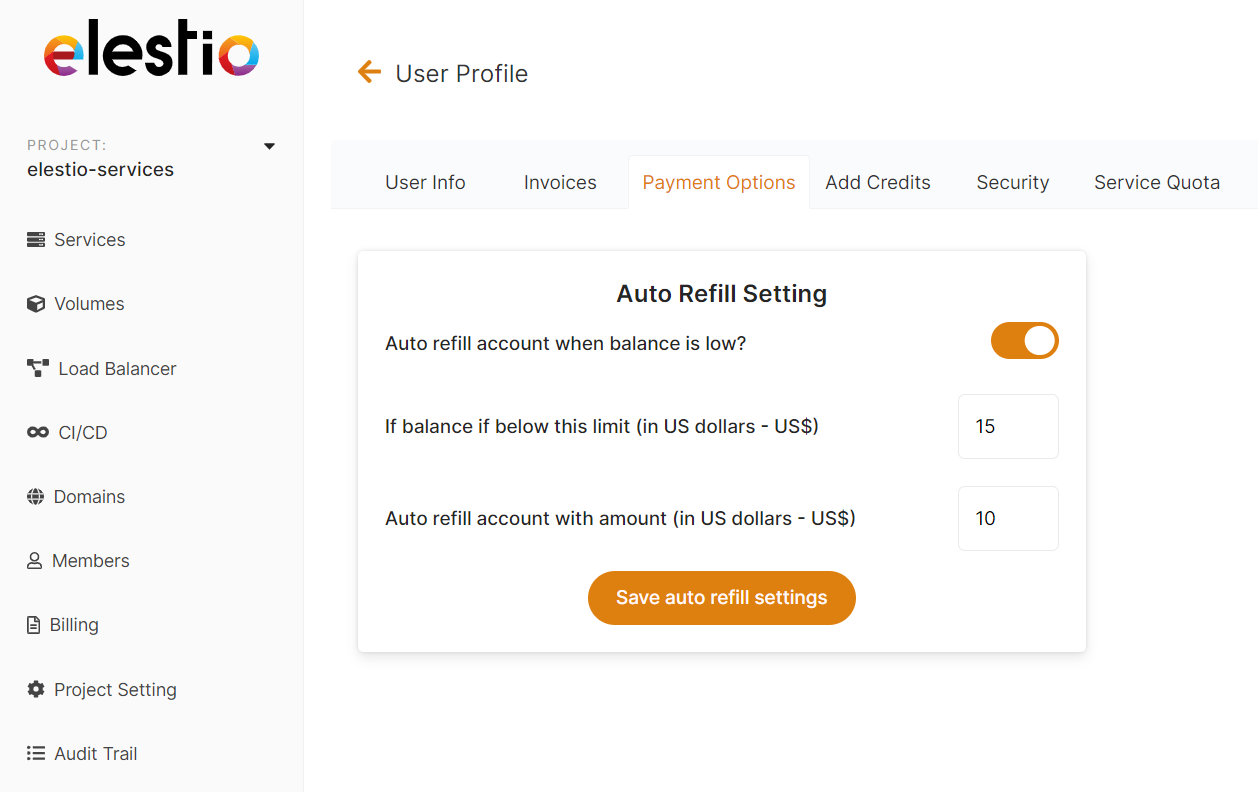
To Enable auto-refill.
- Select the Account tab from the left sidebar menu.
- Select the Payment Options tab.
- Toggle the switch to enable it.
- Enter the minimum balance for activation of auto-refill
- Enter your refill amount
- Save by clicking Save auto refill settings
warning
Currently, all amounts are in US dollars (USD).
To Disable auto-refill.
- Select the Account tab from the left sidebar menu.
- Select the Payment Options tab.
- Toggle the switch to disable it.
- Save by clicking Save auto refill settings.
info
Auto refill is always enabled by default. To turn off Auto refill, just toggle the switch to off and save the configuration.
success
Elestio has a $10 minimum, and a $1,000 maximum per transaction.
If you would like to add a larger amount, contact our sales team for volume discounts.
Related Topics
- Add Credits - Manually add funds to your account
- SEPA Direct Debit - Alternative payment method for Europeans
- Free Trial - Learn how to disable auto-refill during trial