Database FAQ
This section covers frequently asked questions about database management, MySQL configuration, and data handling.
Can I use OUTFILE in Managed MySQL?
Yes it's possible on Elestio. Since we are running MySQL inside a docker container you will have to modify the stack to mount a new volume in the docker-compose. You can edit it with UPDATE CONFIG button from our dashboard.
You will have to add a line like this in the mysql container:
- ./files:/var/lib/mysql-files
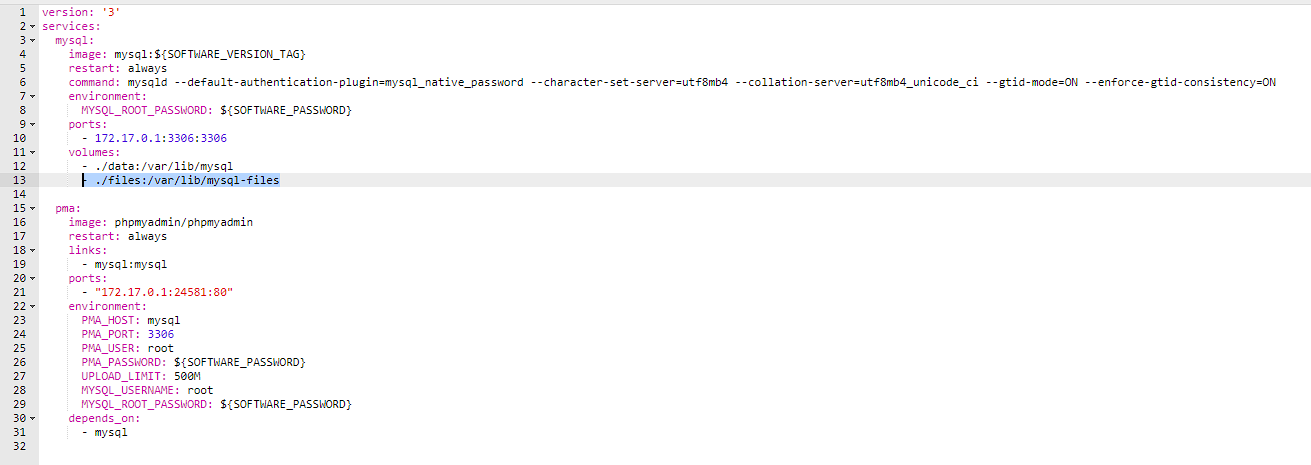
Then click on the button "Apply & restart"
After that you can use queries like this:
SELECT * FROM `help_topic` INTO OUTFILE '/var/lib/mysql-files/test1.csv';
and your file test1.csv will be present on the host vm in /opt/app/files/test1.csv
You can access it over SSH / SFTP / File Explorer / VS Code ...
If you want to use InFile to import CSV to a Table, you must add another option at end of row 6 (command) of the docker-compose file:
--local-infile=1
Then also modify the mysql-docker-cli.sh to add "--local-infile" at the end of it
Finally you can start the cli with:
./opt/app/mysql-docker-cli.sh;
from there you can now load data from CSV with a query like this:
use YOUR_DB_NAME_HERE;
LOAD DATA LOCAL INFILE '/var/lib/mysql-files/yourFile.csv' INTO TABLE yourTableNameHere FIELDS TERMINATED by ',' LINES TERMINATED BY '\n' IGNORE 1 LINES;
You should then see something like: Query OK, 10634 rows affected, 65535 warnings (0.48 sec) Records: 10634 Deleted: 0 Skipped: 0 Warnings: 251949