Infinidisk
Infinidisk turns a bucket into a Linux disk. Format it like any disk (ext4, XFS, btrfs) and use it from any program: there is no size to plan, and you pay only for what is stored.
How it works
- Writes land first in a write log on the machine's local disk, so applications run at local speed. Hot data is served from local caches; the rest is read from the bucket.
- The disk is sent to the bucket in the background, as complete checkpoints (every 60 seconds by default, sooner under heavy writes).
- If the Infinidisk process stops unexpectedly, no acknowledged write is lost: the local write log is replayed.
- If the whole machine stops suddenly (power cut, reboot) or its local disk is lost, the writes made since the last checkpoint sent to the bucket can be lost. The 60-second interval is a target, not a guarantee: heavy writes trigger checkpoints sooner, while a large upload backlog or an Object Storage outage can make the gap longer.
- In every case the disk is never corrupted: you get a consistent disk, and your filesystem or database recovers as after a power cut.
- The disk stays in the bucket. Unmount it, then mount it on another machine with the same commands. One machine at a time: the disk is locked while mounted.
- A bucket can hold several disks: each one has its own name and place in the bucket.
Requirements
A Linux machine (amd64 or arm64) with root access, as on every Elestio service, and a Read and write API key for the bucket.
Set it up
Open the bucket, then the Connect tab, and click Use this bucket as a Linux disk to unfold it.
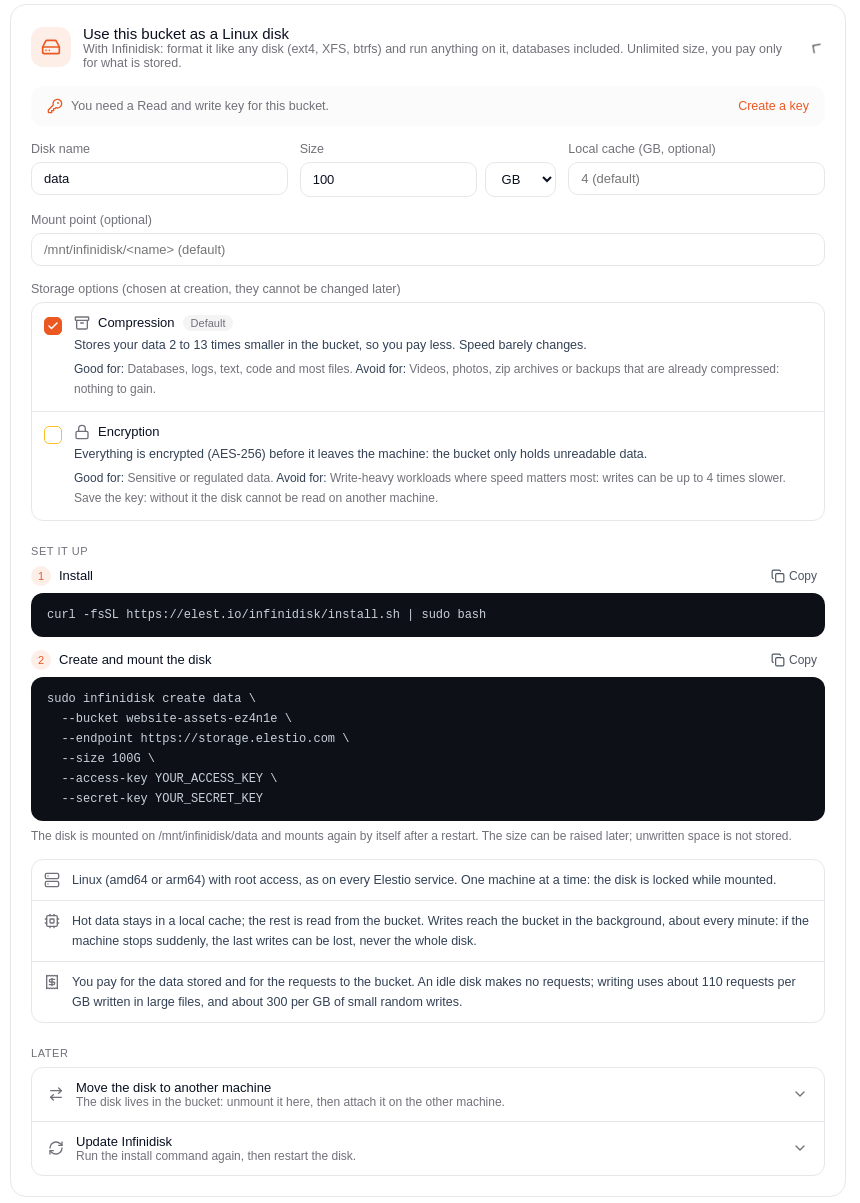
- Enter a disk name and a size (it can be raised later, see Grow the disk; unwritten space is not stored). Optionally set a local cache size in GB (default 4) and a mount point (any empty directory; default
/mnt/infinidisk/<name>). - Copy and run the commands shown:
Install Infinidisk and its runtime:
curl -fsSL https://elest.io/infinidisk/install.sh | sudo bash
Create and mount the disk, with your Read and write key:
sudo infinidisk create <name> \
  --bucket <bucket> \
  --endpoint https://storage.elestio.com \
  --size <size> \
  --access-key <your access key> \
  --secret-key <your secret key>
Add --cache-gb <N> to size the local cache, or --mountpoint /your/path to mount at a custom empty directory instead of /mnt/infinidisk/<name>. To choose storage options (compression, encryption) or turn on point-in-time recovery, add the flags described below to this same command: they can only be set when the disk is created.
The disk is mounted on /mnt/infinidisk/<disk name> (or the mount point you chose), and mounts again by itself after a restart.
Move the disk to another machine
The disk lives in the bucket, and one machine uses it at a time. Stop the applications that use it, then unmount it on this machine: everything is written to the bucket and the disk is freed.
sudo infinidisk umount <name>
On the other machine, install Infinidisk, then attach the disk:
curl -fsSL https://elest.io/infinidisk/install.sh | sudo bash
sudo infinidisk adopt <name> \
  --bucket <bucket> \
  --endpoint https://storage.elestio.com \
  --takeover \
  --access-key <your access key> \
  --secret-key <your secret key>
For an encrypted disk, put the saved key first: sudo env INFINIDISK_KEK=<saved key> infinidisk adopt .... In the dashboard, these commands are under Later > Move the disk to another machine.
Grow the disk
Raise the size with sudo infinidisk resize <name> --size <new size>. The disk is stopped for a moment, mounted again and its filesystem grown: stop the applications that use it first, then start them again.
Update Infinidisk
Run the same install command again: it installs the latest version (or does nothing if it is already installed) and lists the disks still running the previous version.
curl -fsSL https://elest.io/infinidisk/install.sh | sudo bash
A mounted disk keeps running the previous version until it is restarted. Stop the applications that use it (containers too: they keep the old mount), restart the disk, then start them again:
sudo systemctl restart infinidisk-vol@<name>
Restarting writes everything to the bucket first, so no data is lost. To restart every listed disk right away, run the install with INFINIDISK_RESTART=1. To install a given version, set INFINIDISK_VERSION, for example INFINIDISK_VERSION=v1.0.7.
A disk that has run on v1.0.7 cannot be opened by v1.0.6 or older anymore, so INFINIDISK_VERSION=v1.0.6 is not a way back for it. v1.0.7 opens disks written by older versions.
Storage options
Two options change how the disk is stored in the bucket. Your files, your applications and local reads work the same way whatever you choose.
| Option | Default | Flag on infinidisk create | What it does |
|---|---|---|---|
| Compression | On | --no-compression to turn it off | Stores the data compressed (zstd). Text, logs and databases shrink 3 to 8 times. Compression runs in the background, so write latency is unchanged. |
| Encryption at rest | Off | --encryption | Encrypts every page before it leaves the machine. See Encryption at rest. |
The options are chosen when the disk is created and fixed for its whole life. Clones, snapshots and point-in-time restores keep the options of the original disk. For example:
sudo infinidisk create vault --size 100G --bucket ... --encryption        # compression + encryption
sudo infinidisk create media --size 1T --bucket ... --no-compression     # already-compressed data
Which options for my use case?
| Your data | Recommended options | Why |
|---|---|---|
| Databases (PostgreSQL, MySQL, Redis), application files, logs | Default (compression) | 3 to 8.6 times less stored data, and the databases keep 82 to 90% of native speed. |
| Already-compressed files: videos, images, archives, backups | --no-compression | Compression gains little on this data; turning it off skips the work. |
| Sensitive or regulated data | --encryption (compression stays on) | Data is encrypted before it reaches the bucket. Nearly free for applications; keep a copy of the key in a safe place. |
| You need to undo mistakes (bad migration, deleted data) | --pitr-window 24h (or the window you need) | Restore the disk as it was at any moment of the window. |
You can combine them: for example --encryption --pitr-window 24h for a database holding personal data.
Encryption at rest
Add --encryption when you create the disk. Every 4 KiB page is encrypted with AES-256-XTS, using a data key that is itself protected by a key-encryption key (envelope encryption). Compression still works: data is compressed first, then encrypted.
Print the key-encryption key right after creating the disk, and store it in a password manager or a vault:
sudo infinidisk create secrets --size 50GiB --bucket ... --encryption
sudo infinidisk key secrets        # prints the key: store it away from the data
Lose the key, lose the disk: an encrypted disk, and every backup of it, is unreadable without this key.
- Change the key at any time, without rewriting the data: see Rotate the encryption key.
- Restore on a new machine with the saved key: see Restore on a new machine.
- Encrypted disk without a bucket: with
--local, the disk is stored in a directory of the machine's own disk, and only encrypted data is written there. Any service gets encryption at rest without Object Storage:
sudo infinidisk create vault --local /var/lib/infinidisk/vault-store --size 50GiB --encryption
sudo infinidisk key vault          # print the key, then store it safely
Cost: applications barely notice it (PostgreSQL at 85% and MySQL at 90% of native speed with encryption alone). Raw write throughput measured with a disk benchmark tool is about 4 times lower, because every write is encrypted.
Snapshots and point-in-time recovery
Snapshots
A snapshot is a named, read-only copy of the disk at a given moment. It is kept in the bucket and only the changes since take space.
sudo infinidisk snapshot data create nightly                   # take a snapshot
sudo infinidisk snapshot data list                             # list snapshots
sudo infinidisk clone data data-copy --from-snapshot nightly   # new, independent disk from a snapshot
sudo infinidisk rollback data nightly                          # put the disk back to the snapshot
rollback stops the disk, puts it back to the snapshot and restarts it: it replaces the current content, so everything written after the snapshot is lost. To look at old data without touching the disk, use clone instead. Space used by deleted snapshots is reclaimed automatically. Step-by-step procedures are in Backup and restore.
Continuous point-in-time recovery
With a recovery window, Infinidisk keeps a recovery point at every checkpoint (every 60 seconds by default), so you can go back to any moment of the window, not only to named snapshots. Turn it on when you create the disk:
sudo infinidisk create data --size 50GiB --bucket ... --pitr-window 24h
Then:
sudo infinidisk pitr data list                              # all recovery points kept
sudo infinidisk pitr data restore recovered --ago 10m        # state of 10 minutes ago
sudo infinidisk pitr data restore recovered --at 1791670000  # state at a given time (Unix timestamp)
- A restore always creates a new disk (
recoveredabove): the original disk is left untouched. - Points older than the window are removed automatically, and a checkpoint without any change creates no point.
- Storage grows with how much you rewrite during the window: unchanged data is shared by all the points.
- Recovery is at disk level and crash-consistent: the restored disk is like a disk after a power cut at that moment, and your database recovers normally. For recovery to an exact transaction, also use your database's own log archiving (PostgreSQL WAL, MySQL binlog).
Backup and restore
The store is the durable copy of the disk: the bucket (or the --local directory). The mount point is only a view of it. Infinidisk recovery is at disk level and crash-consistent; for a database, also keep the database's own backups or log archiving (PostgreSQL WAL, MySQL binlog) for recovery to an exact transaction.
Take a snapshot
The quickest backup. It is kept in the store and only the changes made after it take space.
- Create the snapshot, with a name you will recognize:
sudo infinidisk snapshot <name> create backup-$(date +%F) - Check it is listed:
sudo infinidisk snapshot <name> list
Make a full off-site backup
A snapshot stays in the same bucket. To protect against the loss of the bucket, copy the store elsewhere.
- Take a snapshot (see above), so the copy contains a known state.
- Copy the store to another location, for example another bucket:
A disk is stored in the folder
aws s3 sync s3://<bucket>/infinidisk/<name> s3://<backup bucket>/infinidisk/<name> \
--endpoint-url https://storage.elestio.cominfinidisk/<name>/of its bucket (sudo infinidisk status <name>shows it).storage.elestio.comuses path-style addressing: set your S3 tool accordingly. For a disk created with--local:sudo rsync -a <store directory>/ <backup directory>/. - If the disk is encrypted, save its key separately from the backup, labelled with the date:
An encrypted backup cannot be read without this key.
sudo infinidisk key <name> > /secure/<name>-$(date +%F).kek
Put a disk back to a snapshot
This replaces the current content of the disk: everything written after the snapshot is lost.
- Stop the applications that use the disk.
- Roll back (the disk is stopped, restored and restarted):
sudo infinidisk rollback <name> <snapshot> - Start the applications again.
Get a copy of a snapshot, side by side
The original disk is not touched. Useful to recover a few files or check old data.
- Create a new disk from the snapshot:
sudo infinidisk clone <name> <new name> --from-snapshot <snapshot> - The copy is an independent disk:
sudo infinidisk listshows it. Copy what you need, then remove it when you are done (sudo infinidisk destroy <new name> --yesremoves it from the machine; its data stays in the store).
Restore to a point in time
Only for a disk created with --pitr-window. The result is always a new disk; the original is not touched.
- List the recovery points kept:
sudo infinidisk pitr <name> list - Restore the moment you need into a new disk, either relative to now or at a given time (Unix timestamp):
sudo infinidisk pitr <name> restore <new name> --ago 10m
sudo infinidisk pitr <name> restore <new name> --at 1791670000 - Check the restored disk (
sudo infinidisk listshows it), then point your application to it, or copy back what you need.
Restore on a new machine (disaster recovery)
When the original machine is lost, attach the disk to a new one. The filesystem is re-attached as it is, without reformatting.
- Make sure the old machine is really stopped.
--takeovertakes the disk over from it, but does not stop it: two machines writing to the same disk would damage it. - If you restore from an off-site backup, copy the store back first (to the bucket, or to the
--localdirectory). - Install Infinidisk on the new machine (see Set it up).
- Attach the disk. For an encrypted disk, pass the saved key with
INFINIDISK_KEK(use the key that matches the backup, see the note below):Use the same disk name and bucket as before: the disk is found in its foldersudo INFINIDISK_KEK="$(cat /secure/<name>.kek)" infinidisk adopt <name> \
--bucket <bucket> \
--endpoint https://storage.elestio.com \
--access-key <your access key> --secret-key <your secret key> \
--takeoverinfinidisk/<name>/. Add--prefix <folder>only if the disk was created with a custom prefix, or if you attach it under a different name. For a disk created with--local, use--local <directory>instead of the bucket options. For a disk without encryption, leave outINFINIDISK_KEK. - Check the data, then start your applications.
Rotate the encryption key
Rotate the key when it may have been exposed, for example after someone with access leaves. Rotation is instant, rewrites no data and is safe while the disk is mounted: only the key that protects the data key changes.
- Rotate, with a new random key (or derived from your own secret with
--key <your secret>):sudo infinidisk key <name> --rotate - The new key is printed first, before anything changes: save it right away in your vault, labelled with the date. The machine's own settings are updated automatically.
- From now on, the previous key no longer opens the disk. You can print the current key at any time with
sudo infinidisk key <name>.
Keep the old keys as long as the matching backups. A backup of the store made before a rotation still needs the old key to be restored. Keep every saved key, labelled with its date, for as long as you keep backups made with it. Lose the key, lose the disk.
Performance
The tables below were measured with Infinidisk v1.0.6 on a 4 vCPU virtual machine, compared with the native disk of the same machine. These are short runs: use them as a direction, not a guarantee, and test with your own workload.
What v1.0.7 improves
Measured on a 4 vCPU machine, v1.0.6 compared with v1.0.7 (the disk stored on the machine itself, except the second line, read from a real bucket):
| v1.0.6 | v1.0.7 | |
|---|---|---|
| Requests to the bucket, PostgreSQL 10 million rows loaded, indexed, vacuumed and scanned | 5,400 GETs | 43 GETs |
| Requests to the bucket, first sequential read of 4 GiB from a real bucket | 8,802 GETs | 2,363 GETs |
| Random 4K reads, cached, depth 1 | 12,000 to 13,000 IOPS | 37,000 IOPS |
| Mixed reads and writes (70/30), depth 16 | 16,000 to 20,000 + 7,000 to 8,000 IOPS | 93,000 + 40,000 IOPS |
| PostgreSQL (pgbench) | 10,100 to 11,000 TPS | 12,700 TPS |
Random 4K writes are unchanged. Fewer requests also means a lower request bill.
Applications
Each application keeps its data directory on an Infinidisk disk, with its default settings and no configuration change:
- Small random writes are faster than the native disk: 437% of native (fio, 4 KiB random writes), and Redis with
appendfsync alwaysat 209%. - WordPress runs at native speed (99%).
- MySQL keeps 90% and PostgreSQL 82% of native speed.
Storage options compared
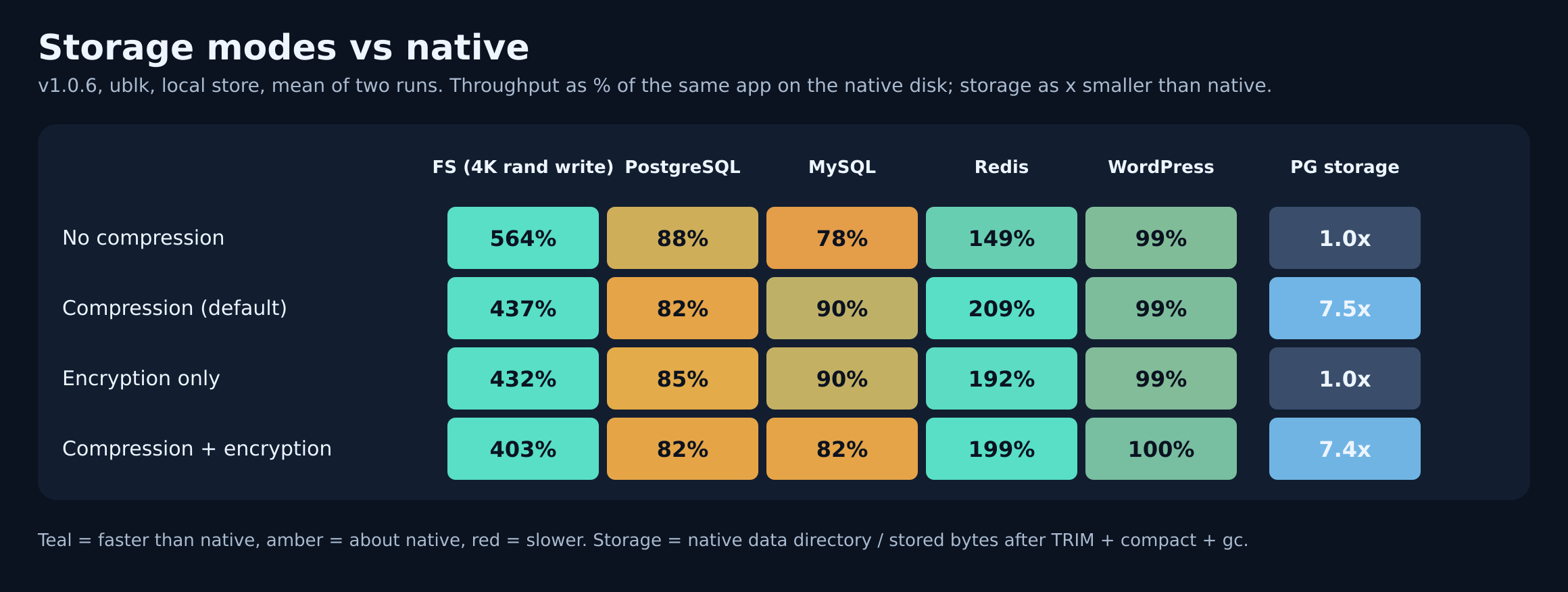
Each cell is the speed as a percentage of the same application on the native disk, then the stored size compared with the native data directory:
| Option | Files (4K random writes) | PostgreSQL | MySQL | Redis | WordPress |
|---|---|---|---|---|---|
| No compression | 564% · 1.0× | 88% · 1.0× | 78% · 1.0× | 149% · 8.9× larger | 99% · 1.4× smaller |
| Compression (default) | 437% · 1.7× smaller | 82% · 7.5× smaller | 90% · 2.9× smaller | 209% · 8.6× smaller | 99% · 6.8× smaller |
| Encryption only | 432% · 1.0× | 85% · 1.0× | 90% · 1.3× larger | 192% · 8.9× larger | 99% · 1.0× |
| Compression + encryption | 403% · 1.7× smaller | 82% · 7.4× smaller | 82% · 3.0× smaller | 199% · 8.6× smaller | 100% · 6.8× smaller |
- Compression is the option that pays off: 1.7 to 8.6 times less stored data, with no real speed cost.
- Encryption is nearly free for applications.
- Small datasets look larger without compression because the disk also stores the filesystem journal (about 128 MiB): Redis keeps only 18 MB of data here.
Reads: first read and cached reads
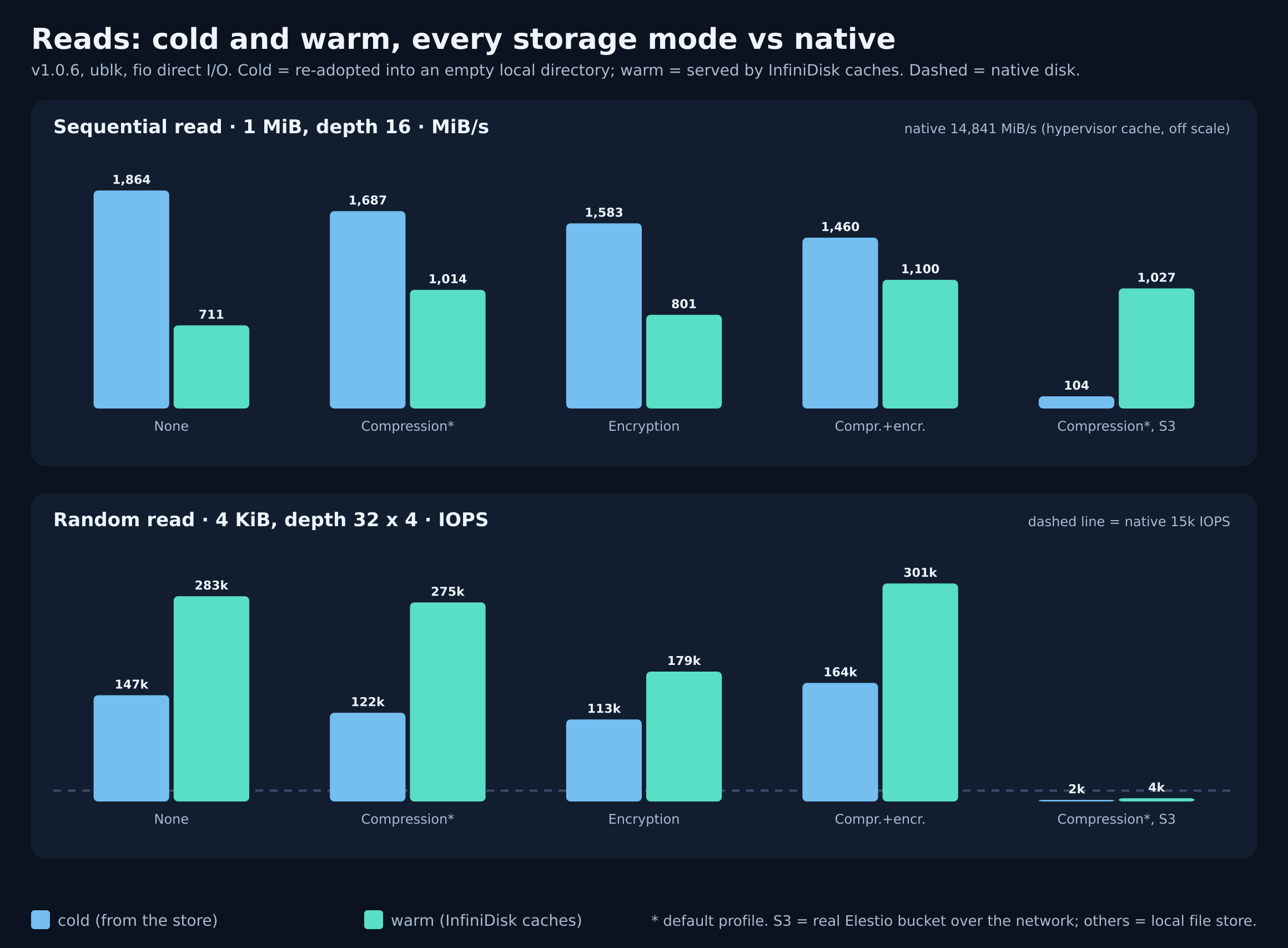
A cold read is the first time data is read: it comes from the bucket. A warm read is served by the local caches.
- On a real Elestio bucket, the cache makes reads 10 times faster: a first sequential read at 104 MiB/s (close to the machine's network link, about 110 MiB/s) comes back at 1,027 MiB/s once cached.
- Cached random reads reach 275,000 to 307,000 IOPS, about 20 times the native disk (15,000 IOPS), compression and encryption included.
All read numbers
| Option | Sequential read, cold | Sequential read, warm | Random read, cold | Random read, warm |
|---|---|---|---|---|
| Native disk | 14,841 MiB/s | (same) | 15,044 IOPS | (same) |
| No compression | 1,864 MiB/s | 711 MiB/s | 146,771 IOPS | 283,499 IOPS |
| Compression (default) | 1,687 MiB/s | 1,014 MiB/s | 122,481 IOPS | 275,045 IOPS |
| Encryption only | 1,583 MiB/s | 801 MiB/s | 113,401 IOPS | 179,397 IOPS |
| Compression + encryption | 1,460 MiB/s | 1,100 MiB/s | 163,855 IOPS | 301,253 IOPS |
| Compression, real Elestio bucket | 104 MiB/s | 1,027 MiB/s | 2,088 IOPS | 4,371 IOPS |
Except for the last line, the disk is stored in a directory of the same machine, so even cold reads are fast. The native sequential figure comes from the hypervisor's cache, not the physical disk. On the real bucket, the 15-second cold pass fetched only about 12% of the file, so the warm random figure is still mostly cold.
Storage used: real data
Measured with Infinidisk v1.0.6 on a real Elestio bucket, default options (compression on), 10 million lines:
| Data | On the machine | Stored in the bucket | For comparison |
|---|---|---|---|
| Web server logs (nginx access log) | 2.81 GB | 529 MB, 5.3 times smaller | gzip: 476 MB; zstd: 467 MB |
| Application logs (JSON) | 3.33 GB | 689 MB, 4.8 times smaller | gzip: 649 MB; zstd: 630 MB |
| PostgreSQL (the nginx log as a table with 3 indexes) | 3.89 GB data directory | 1.27 GB, 3.1 times smaller, once the space of deleted files is reclaimed | the same data directory compressed with zstd: 1.17 GB |
- Text compresses more than a database. A database page holds binary values and random identifiers that do not compress, so plan on about 3 times for a database and about 5 times for logs. Data full of repeated values compresses more (the pgbench data used above shrinks 7.5 times).
- Right after a large load, the bucket can hold about twice the final size for a while: building indexes and vacuuming rewrite pages. Since v1.0.7 the old copies are removed within about 5 to 15 minutes, even when the disk is idle.
- Deleted files free their space by themselves. Since v1.0.7 the disk is mounted with
discard, so the space of deleted files (a database's temporary files for sorts and index builds, for example) is freed in the bucket automatically. Only a disk still on v1.0.6 needssudo fstrim /mnt/infinidisk/<name>after a large load.
On a real Elestio bucket
On a 4 vCPU machine with its disk on storage.elestio.com (default options):
- PostgreSQL (pgbench): 10,400 transactions per second, 0.77 ms average latency.
- MySQL (sysbench): 1,380 transactions per second over 120 seconds, with no stall.
- Sequential write: 134 MiB/s. A single file copy reads back at 90 to 131 MB/s.
- No requests to the bucket while the disk is idle, and data verified after unmounting and mounting again.
Good practices
- Size the local cache for the data you use. The default (4 GB) suits most machines; for a database, give it at least the size of the database plus some margin, for example
--cache-gb 8for a 4 GB database. A cache smaller than the working set makes every scan read from the bucket again. - Keep Infinidisk up to date (see Update Infinidisk). Since v1.0.7, the space of deleted files is freed in the bucket automatically; on v1.0.6, run
sudo fstrim /mnt/infinidisk/<name>after a large load or a large delete. - Check how far behind the disk is with
sudo infinidisk status <disk name>: the pending to S3 value is what is not in the bucket yet. - Before moving a disk to another machine, or restarting after heavy writes: stop the application, then
sudo infinidisk umount <name>drains the remaining writes to the bucket before releasing the disk. - If you use encryption, save the key (
sudo infinidisk key <name>) as soon as the disk is created. - For a database, keep regular backups of the database itself, or use point-in-time recovery together with your database's log archiving.
Cost
You pay for the data stored and for the requests made to the bucket. An idle disk makes no requests. Writing uses about 110 write requests per GiB written sequentially, and about 300 per GiB of small random writes. Compression reduces the stored data; snapshots and a recovery window add the space needed by the data rewritten meanwhile. See Billing and limits.